Why a week, not a day
Weekdays and weekends look different, and many things happen once or twice a week: workouts, groceries, a standing dinner. A single day hides those patterns. A week is the shortest cycle in which most of your schedule repeats, which is why time-management writers keep suggesting you log all 168 hours.
National statistics work the same way. Korea’s Time Use Survey, for example, asks respondents aged 10 and over to fill in a diary in 10-minute slots. In the 2024 round (published July 2025), average sleep came out at 8 hours 1 minute a day.
The basic 168-hour math
| Item | Example (office worker) | Weekly total |
|---|---|---|
| Sleep | 7 hours x 7 days | 49 h |
| Work (incl. lunch) | 9 hours x 5 days | 45 h |
| Commute | 1.5 hours x 5 days | 7.5 h |
| Left over | 168 − 49 − 45 − 7.5 | 66.5 h |
Even after meals, showers and chores, a large part of that remains. Finding out where it actually goes is the point of the exercise. Swap in your own numbers.
How to log one week
- Pick 5 to 8 categories. Sleep, work or study, travel, chores and childcare, exercise, screen time, people, other. Too many categories and you will give up halfway.
- Use 10- to 30-minute units. Ten minutes is precise; thirty is enough to see patterns on a first try.
- Do not batch it. Fill it in about three times a day, at lunch, on the way home and before bed, while memory is fresh.
- Choose an ordinary week. Skip holidays, business trips and exam weeks.
- Judge only at the end. If you start fixing things mid-week, you are logging a performance, not your normal week.
How to read the log
- Biggest block first — after sleep and work, which category is largest? It is often screens or travel.
- Fragmentation — days full of sub-30-minute scraps have less usable time even when the total looks the same.
- Day-to-day imbalance — if one day is packed, moving a single commitment to another day usually helps most.
- Compare with intent — write down what you want (say, 3 hours of exercise) and compare. See plan vs. actual.
Curious how daily habits add up over a lifetime? Try the lifetime hours of a daily routine.
Logging and totals in the app
The Android app Weekly Timetable is built for planning a week ahead, but a separate logging profile turns it into a one-week time diary.
Create a logging profile
Tap the pencil icon at the top of the Timetable tab (Timetable profiles), create a profile such as “This week log” and select it. Your usual timetable stays untouched.
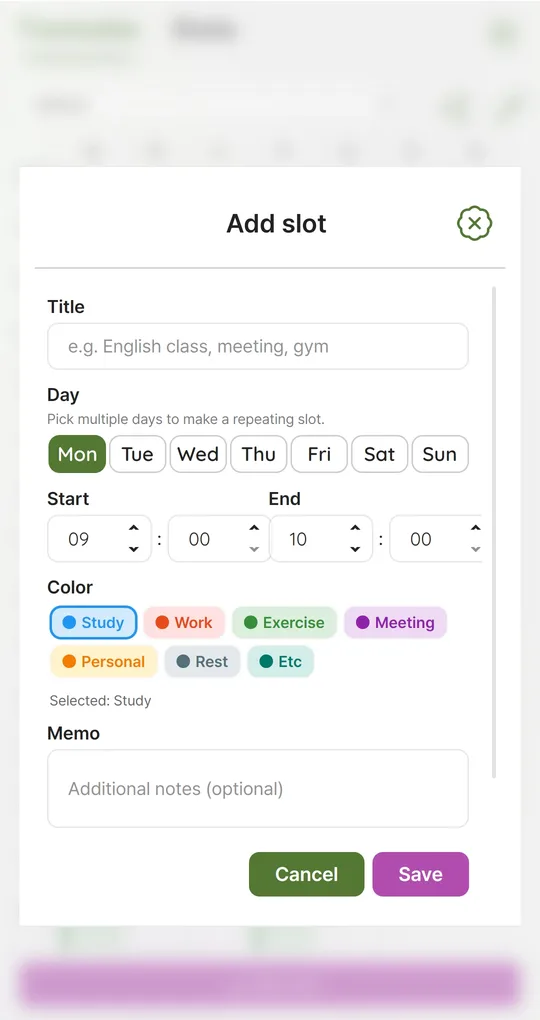
Enter what you did as slots
Use Add slot to set the day, start and end time (10-minute steps) and a color tag. The seven built-in tags are Study, Work, Exercise, Meeting, Personal, Rest and Etc; add tags like “Commute” or “Sleep” under Settings > Color tags.
Split sleep at midnight
A slot cannot cross midnight, so 23:00–07:00 sleep goes in as 23:00–24:00 plus 00:00–07:00 on the next day. If it is the same every day, select several days at once to make one repeating slot.
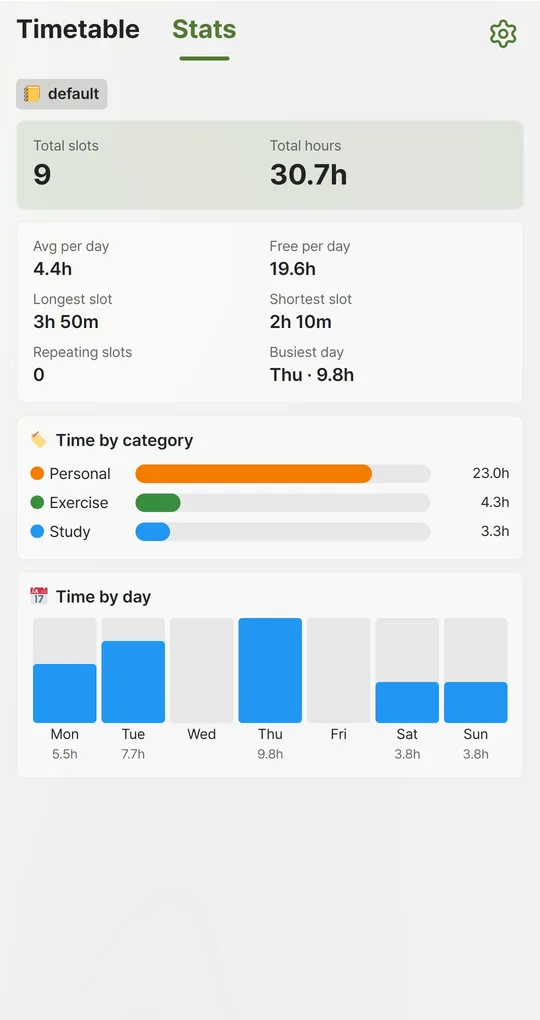
Read the totals in Stats
The Stats tab shows total hours, average per day, time by category and time by day for the active profile. “Free per day” is 24 hours minus your daily average, so in a logging profile it means time you have not logged yet. Overlapping slots are counted twice, so look out for the red overlap marker.
The screenshots were taken with Korean sample entries, so slot titles and some weekday labels appear in Korean; menus and buttons are in English.
FAQ
Logging a whole week sounds tedious.
Log one weekday and one weekend day, then multiply by 5 and 2. You will see the big blocks, though you will miss day-specific commitments.
How do I log phone time?
Note the daily total from your phone’s screen-time feature separately and only put blocks of 30 minutes or more on the timetable.
Sources: Newsis, Korea 2024 Time Use Survey results (Korean)
Weekly Timetable - Planner
No sign-up, works offline, and your timetable stays on your phone. Free on Android, in English and Korean.