Three common rule sets
| South Korea | United States (FLSA) | European Union | |
|---|---|---|---|
| Basic line | 40 h a week, 8 h a day | 40 h in a workweek | 48 h a week on average, including overtime |
| Beyond it | Up to 12 h overtime a week by agreement (52 h cap) | No federal cap; overtime pay of at least 1.5x for non-exempt employees | Averaged over a reference period (up to 4 months as a rule) |
| What “week” means | 7 days including rest days | Fixed, recurring 168 hours (seven 24-hour periods) | 7-day period |
| Daily rule | Over 8 h a day is overtime | None federally (some states have daily overtime) | At least 11 consecutive hours of daily rest |
The US federal law does not require premium pay for weekends or holidays as such; only hours over 40 in the workweek count. EU member states implement the directive in their own laws, and some allow individual opt-outs.
Counting step by step
- For each day, take time worked minus unpaid breaks.
- Add the seven days of your workweek, including weekend days.
- Compare with your rule: the 40-hour line (US), 40 + 12 (Korea), or your average over the reference period (EU).
- Where a daily rule exists (Korea, some US states), also check each day separately.
| Week | Hours worked | Korea (40 + 12) | US federal |
|---|---|---|---|
| Mon–Fri 9:00–19:00, 1 h lunch | 9 x 5 = 45 h | 5 h overtime, within cap | 5 h overtime pay |
| Same + 4 h on Saturday | 49 h | 9 h overtime, within cap | 9 h overtime pay |
| Mon–Fri 9:00–21:00, 1 h lunch | 11 x 5 = 55 h | 15 h overtime, over the cap | 15 h overtime pay |
Korea example in detail
- Breaks: at least 30 minutes per 4 hours and 1 hour per 8 hours worked, excluded from working time.
- Since a 2018 amendment, a week means 7 days including rest days, so weekend work counts inside the same 52 hours.
- Overtime, night work (22:00–06:00) and holiday work are paid at least 50% extra.
- Workplaces with fewer than 5 regular employees are excluded from the hour limits, and some transport and health industries have special rules.
- A bill on mandatory working-time records and limits on fixed “inclusive” overtime pay was still under discussion in July 2026; check whether it has passed.
Totaling a work week in the app
Stats in the Android app Weekly Timetable simply add up slot lengths, so a profile that holds only work gives you the weekly total directly.
Create a “Work log” profile
Use the pencil icon to add a work-only profile, so personal plans do not mix into the total.
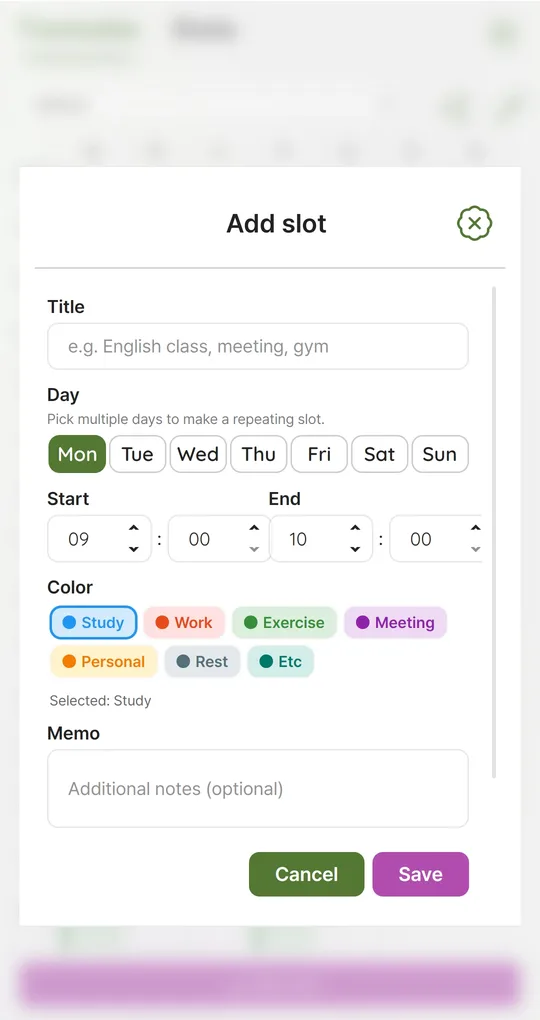
Split slots around breaks
For 9:00–19:00 with lunch at 12:00–13:00, enter 09:00–12:00 and 13:00–19:00. The break drops out automatically. Select several days to make a repeating pattern, then edit only the days that differ.
Split overnight shifts at midnight
Slots cannot cross midnight. A 20:00–02:00 shift becomes 20:00–24:00 plus 00:00–02:00 on the next day. To see night hours separately, split again at 22:00 and use another color.
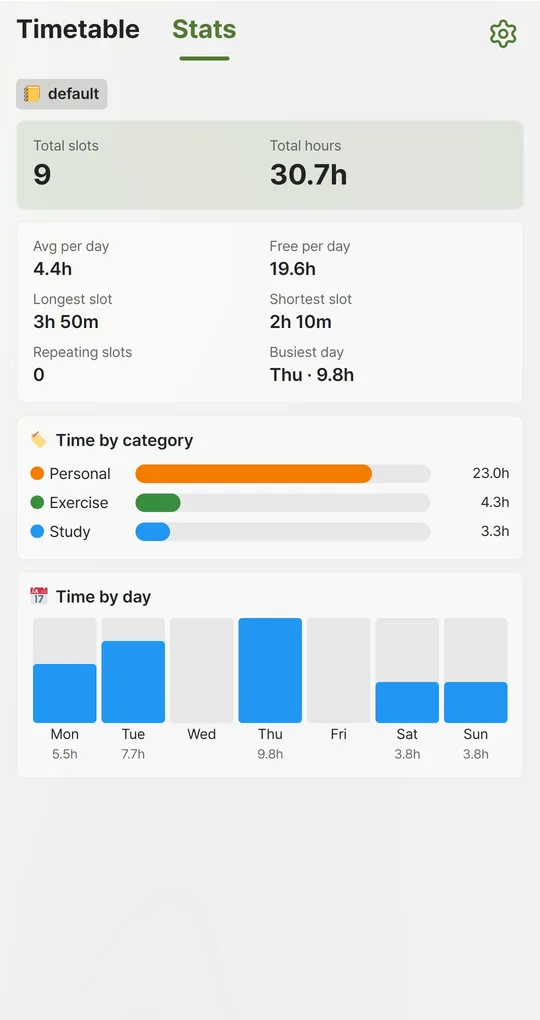
Read Total hours
Total hours in Stats is your weekly total and Time by day shows each day. Overlapping slots are counted twice, so make sure no red overlap marker is showing.
The screenshots were taken with Korean sample entries, so slot titles and some weekday labels appear in Korean; menus and buttons are in English.
FAQ
Does commuting count?
Normal commuting generally does not count as working time in any of the three systems, but travel during the workday or on the employer’s instructions can. Check the local rules.
Can I use the app as evidence?
It is a schedule you typed in, not a time clock. In a dispute, objective records such as badge logs and message timestamps matter more.
Sources: US Department of Labor, Fact Sheet #23: Overtime Pay · EUR-Lex, Working Time Directive 2003/88/EC · Korea Law Information Center, Labor Standards Act (Korean) · Korea.kr, 52-hour workweek (Korean)
Weekly Timetable - Planner
No sign-up, works offline, and your timetable stays on your phone. Free on Android, in English and Korean.