What time-use data shows
Time-use surveys in many countries find that in dual-earner couples, mothers still spend more time on housework and care. Korea is one clear example: an analysis of the 2024 Time Use Survey presented in May 2026 found wives in dual-earner households spent 181 minutes a day on housework and care versus 78 for husbands, a 103-minute gap, down from 180 minutes in 2014.
Averages are averages. What matters is your household’s actual numbers.
What to put on the chart
- Fixed times: morning routine and drop-off, pickup, rides to activities, dinner, bath and bedtime
- Weekly tasks: groceries, laundry, doctor visits, school supplies
- Invisible work: school emails and group chats, coordinating schedules. Even 10–20 minutes a day only becomes visible as a slot.
- Outside help: grandparents, sitters, after-school programs
Ways to split
- The parent with fixed hours takes a fixed slot (drop-off or pickup); the one with flexible hours handles the surprises (sick days, early pickups).
- Keep the same task with the same person to cut hand-offs. Splitting by task confuses less than splitting by day.
- Totals do not have to be equal; agree on them with work hours on the table.
- Review monthly. New grades, activities and jobs change the split.
If the kids’ activities themselves clash or leave no travel time, start with checking after-school activity clashes and travel time.
Hours per person in the app
Stats in the Android app Weekly Timetable total time by color tag. Make the tags people instead of activities and you get the split.
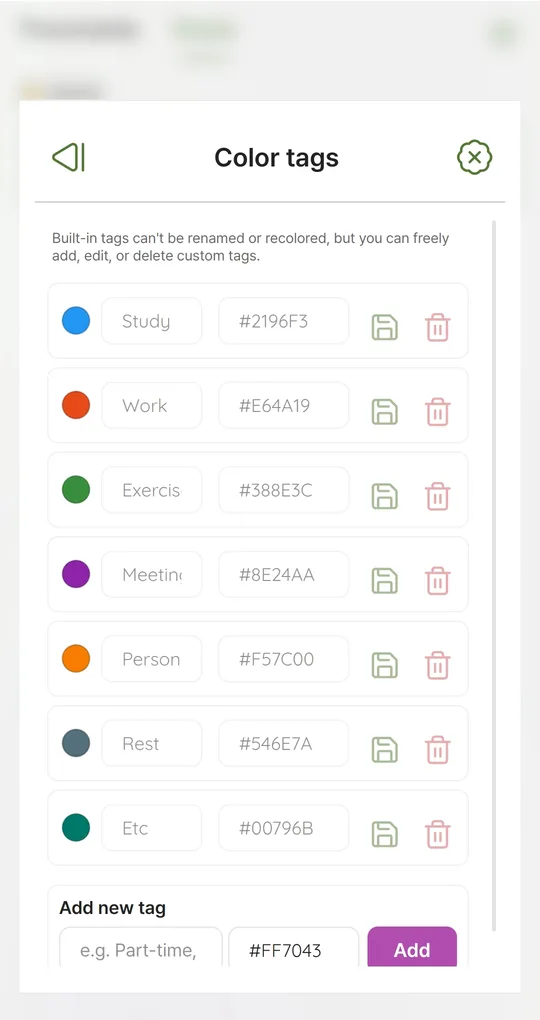
One tag per person
Under Settings > Color tags, add “Mom”, “Dad”, “Grandma”, “Sitter” and so on, with clearly different colors.
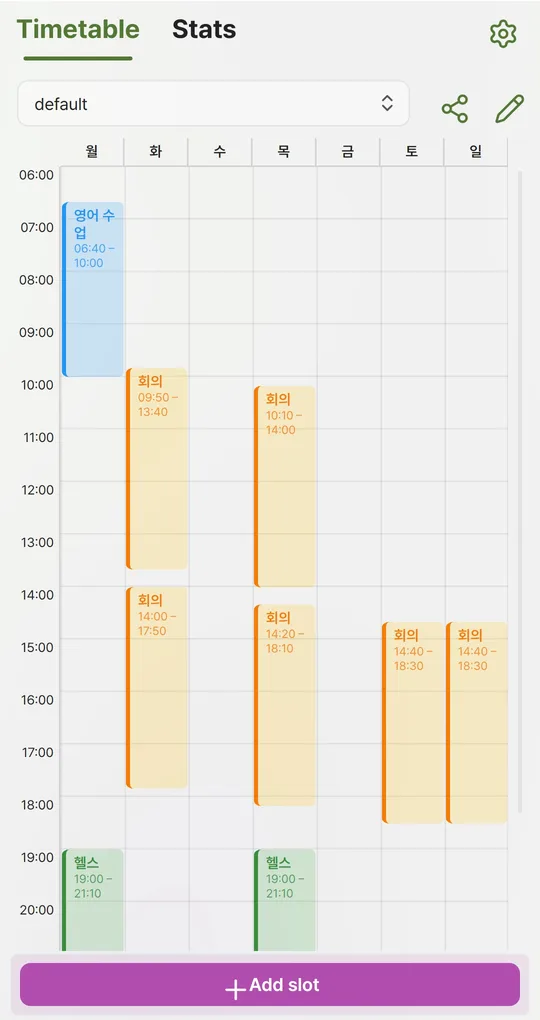
Fill in a family profile
Create a “Family childcare” profile and enter each task with the tag of the person covering it. Use repeating slots for daily tasks. Hours nobody covers stand out immediately.
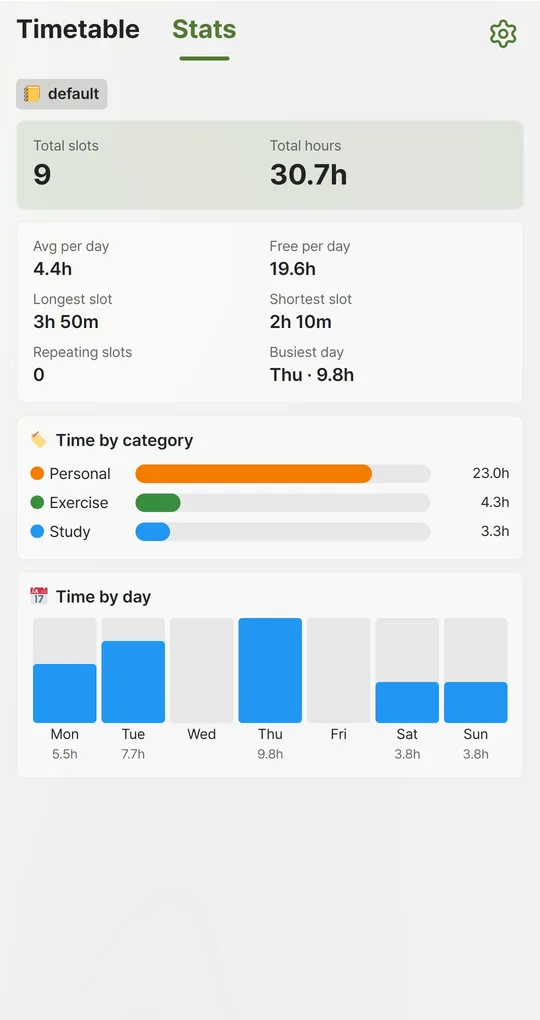
Read hours per person in Stats
Time by category shows weekly hours per tag, which here means per person. Things you do together at the same time get an overlap marker and count for both, which is fine if you really do them together.
Reminders for pickups
Turn on reminders in Settings > Notifications (at start or 5–60 minutes before). They fire on each phone for its active profile, so to share one timetable, export a JSON file in Backup / Restore and import it on the other phone. Importing replaces all data on that phone.
The screenshots were taken with Korean sample entries, so slot titles and some weekday labels appear in Korean; menus and buttons are in English.
FAQ
Do edits sync between our phones?
No. The app stores everything on the phone with no server. One person maintaining it and sharing the PNG image after changes is the practical approach.
What about school holidays?
Keep a separate “Holidays” profile and switch to it for those weeks.
Sources: Newsis, dual-earner housework and care gap (Korean, 2026) · Newsis, Korea 2024 Time Use Survey results (Korean)
Weekly Timetable - Planner
No sign-up, works offline, and your timetable stays on your phone. Free on Android, in English and Korean.