What Select all means in a group
Cleaner screens come in two shapes.
- Grouped views show several identical or near-identical photos as one set: exact duplicates, similar photos, similar videos. Selecting the whole set includes the one you meant to keep.
- Flat lists show photos judged one at a time: screenshots, blurry shots, document photos. Nothing else disappears when you select all here, but wrongly detected photos are in the list too.
Almost every accident happens in the first kind. If an app offers Select all on a group, simply never using that button removes most of the risk.
Where detection gets it wrong
| Category | Common false positive | Why |
|---|---|---|
| Similar photos | Different moments from the same spot | Matching composition and colour make the fingerprints close |
| Blurry | Portraits with a deliberately soft background | A single sharpness number cannot tell intent from failure |
| Too dark | Night scenes, silhouettes, stage shots | Darkness on purpose looks like darkness by accident |
| Documents | Menus and signs photographed straight on | Bright, low colour and full of text is exactly the signature |
| Screenshots | Captured receipts and booking confirmations | A folder name says nothing about importance |
Which is why an automatically generated flat list should open with nothing selected. Only what a person looked at should go.
Seven things to check
- Does a group structurally keep one photo, rather than relying on you not to tick it?
- Do automatic lists open with zero selected?
- Does deletion go through the trash? On Android 11 and up you should see the system confirmation dialog.
- Is there a restore screen inside the app?
- Can you exclude favorites and whole albums?
- Does it state that nothing is uploaded and that analysis happens on the device?
- Can you compare two photos large before deciding?
Habits that prevent accidents
- Start with exact duplicates only. That is the category with the least room for error.
- Work in small batches rather than hundreds at a time. Mistakes stay easy to undo.
- Do not empty the trash right after a cleanup. Give it a few days.
- Put the albums that matter out of reach entirely.
In PhotoSweep
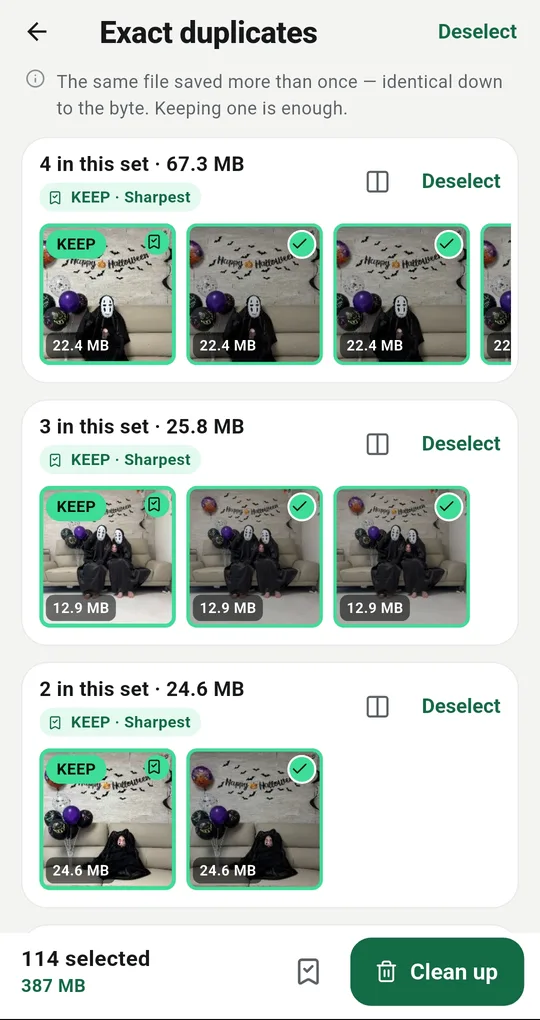
A group cannot be selected whole
Group screens in PhotoSweep have no Select all. There is only Select rest, and the photo marked KEEP is not part of the selection at all. Tapping it opens a large preview instead of ticking it — and that preview is where you switch to keeping a different shot.
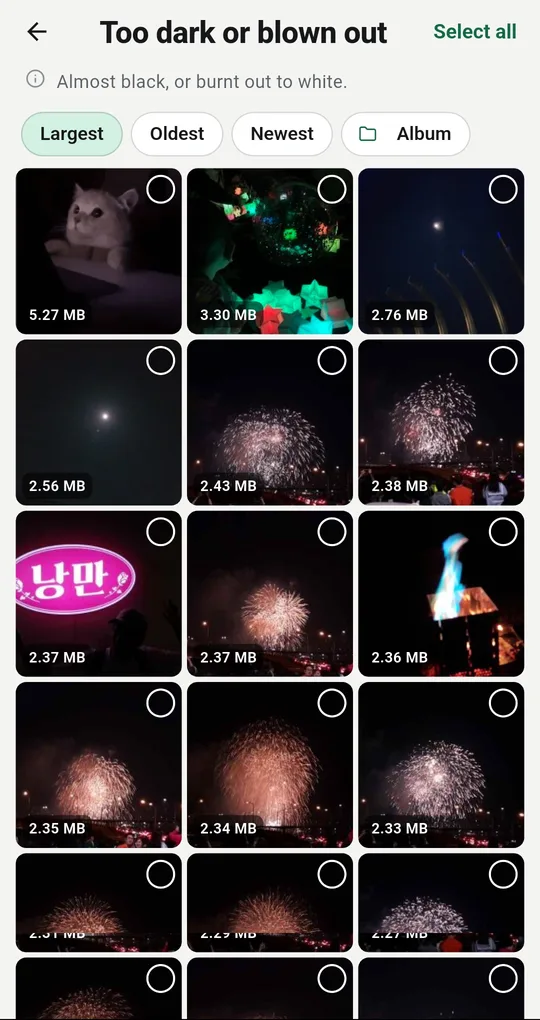
Flat categories start at zero
Automatically judged categories such as Too dark or blown out open with nothing selected. There is a Select all at the top, but pressing it is your decision. Sort by largest, oldest or blurriest and work through them by eye.
One exception: messenger re-saves
One flat category does open fully selected: Messenger re-saves. It only ever contains copies whose camera original is still present at the same or higher quality, so removing them loses nothing. Even so, it is worth opening a few previews before you tap.
FAQ
How is the keeper chosen?
The sharpest shot by default. You can switch that to the largest file or the most recent in Settings, and a photo starred in your gallery always stays. Each group shows the reason it picked that one.
A favorite showed up as a candidate.
The Never touch favourites setting was off. With it on, starred photos are kept out of every category.
I deleted something by mistake and noticed straight away.
On Android 11 and up it is in the system trash. Open Cleanup history and restore in the More tab and bring it back.
PhotoSweep: Duplicate Cleaner
One photo in every group always stays. An Android photo cleaner that keeps every bit of analysis on your device.