Why not rice
Apple’s support page says not to put your iPhone in a bag of rice, because small particles of rice could damage it. Rice dust in the charging port or speaker openings is harder to get out than water. Samsung’s guidance doesn’t mention rice either; it says to dry the phone somewhere well ventilated.
What manufacturers recommend
| Step | What to do | Source |
|---|---|---|
| 1 | Wipe the outside with a soft, clean cloth | Samsung |
| 2 | Tap it gently against your hand, port and speaker facing down | Apple, Samsung |
| 3 | Leave it to dry with airflow, out of strong sunlight | Apple, Samsung |
| 4 | No hair dryer, no external heat, no compressed air | Apple, Samsung |
| 5 | Don’t push cotton swabs or paper towels into the port | Apple |
| 6 | Get it checked if anything still seems wrong | Samsung |
For older phones that aren’t water resistant, Samsung says to power off and remove the battery, SIM and memory card.
Seawater or a drink
Samsung advises rinsing a water-resistant phone in clean water straight away if it was exposed to anything other than fresh water. Salt and sugar stay behind in the port and grille as it dries. After rinsing, dry it as above.
When to charge
Apple says to tap out the excess liquid, then leave the phone in a dry area with airflow for at least 30 minutes before charging. Samsung warns that connecting a charger or accessory while the port is wet can damage the phone. If you see a liquid detection alert, follow it.
If the speaker is muffled
If only the speaker sounds dull while the phone dries, you can push the water out of the grille with sound. In the Android app SonicKit:
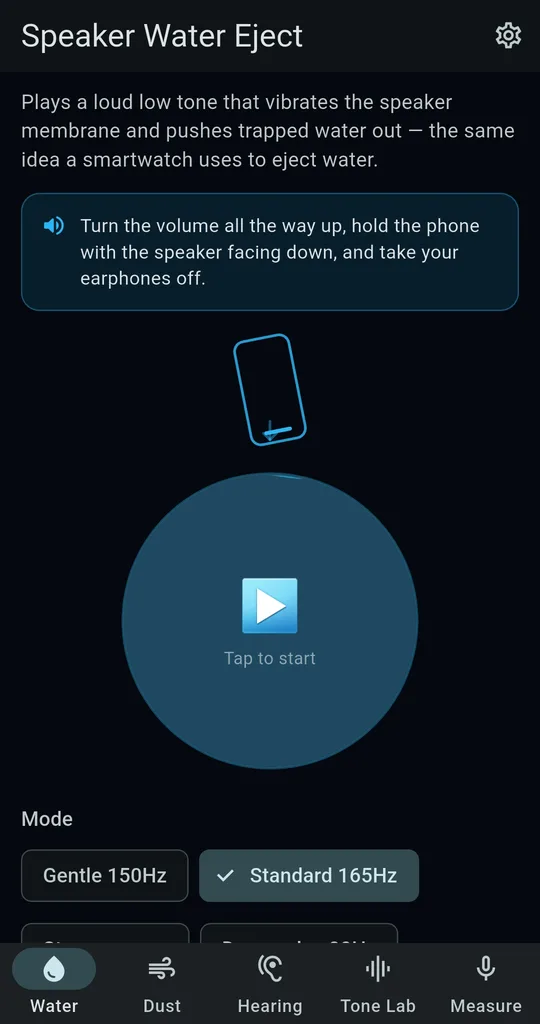
Water tab, Standard 165Hz
Hold the phone speaker-down and run Standard 165Hz for 20 seconds, with earphones unplugged.
Wipe, repeat, then air dry
Wipe off the water that comes out, run it once or twice more, then let it air dry. If the phone won’t charge or power on properly, that isn’t something an app can fix.
FAQ
What about silica gel packets?
They aren’t in Apple’s or Samsung’s guidance either. What they agree on is no heat and plenty of airflow.
My phone is IP68. Do I need to worry?
Water resistance ratings are tested in clean water under set conditions, and Samsung says to avoid seawater, pool water and soapy water. See the pool and beach guide.
SonicKit - Speaker Water Eject
No sign-up, and it works without an internet connection. Free on Android.