Why log it
- The same reason in a short period invites doubt, even when true.
- Leave balances and attendance disputes need dates.
- Your own patterns (late every Monday?) become visible.
What to log
| Field | Example |
|---|---|
| Date and time | Sep 14, 9:30 message |
| Type | Late / leave early / step out / day off |
| Reason | Family commitment |
| Outcome and note | Approved, certificate submitted |
Excuse Maker is an app made for fun. For real attendance messages, telling the truth is always the safest option. Adapt the example messages here to what actually happened.
Reconcile with work records
Once a quarter, compare your log with the company’s attendance system. You’ll catch missing entries or wrongly booked leave early.
Doing it in the app
1
I’ll use this one → logged
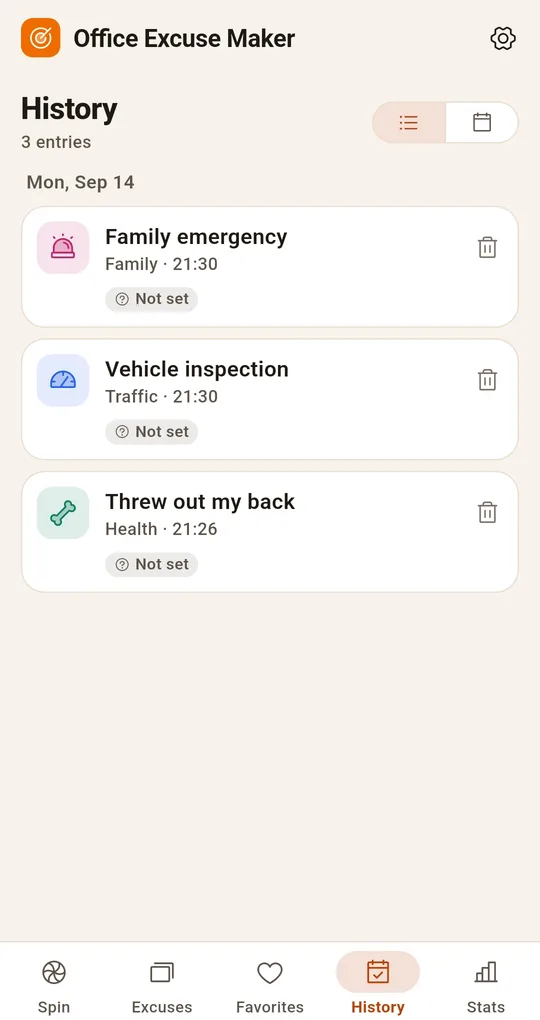
Tap "I’ll use this one!" on a result card in Excuse Maker and it’s logged with the date and time. If you already used that reason today, it tells you.
2
Outcome and notes
Tap an entry to mark It worked or It flopped and add a note; switch to the calendar to browse by date. "How about these again?" on the Stats tab surfaces reasons you haven’t used in a while.
FAQ
Can I back it up?
Export and import a backup file from Settings. Data stays on the device.
Can I delete entries?
Delete individual entries, or wipe everything from Settings.
Office Excuse Maker Roulette
No sign-up, fully offline, made for fun. Free on Android.