What a GIF needs
A GIF is built from each original shot, not the finished strip. If only the finished image is left, the shots cannot be separated again and there is no GIF.
Shooting for a better GIF
- Keep the phone still — a fixed background makes only the people move. Handheld shots make the whole frame jump.
- Same spot, changing move — raising a hand bit by bit or stepping closer each shot looks natural.
- More shots, smoother — 6 or 8 cuts look smoother than 2.
- Short intervals — 3 seconds between shots keeps motion from jumping too much.
Making a GIF in the app
Steps in the Android app "Photo Booth".
Make sure Keep original cuts is on
Keep original cuts in settings must be on. It is on by default; photos taken with it off cannot become GIFs.
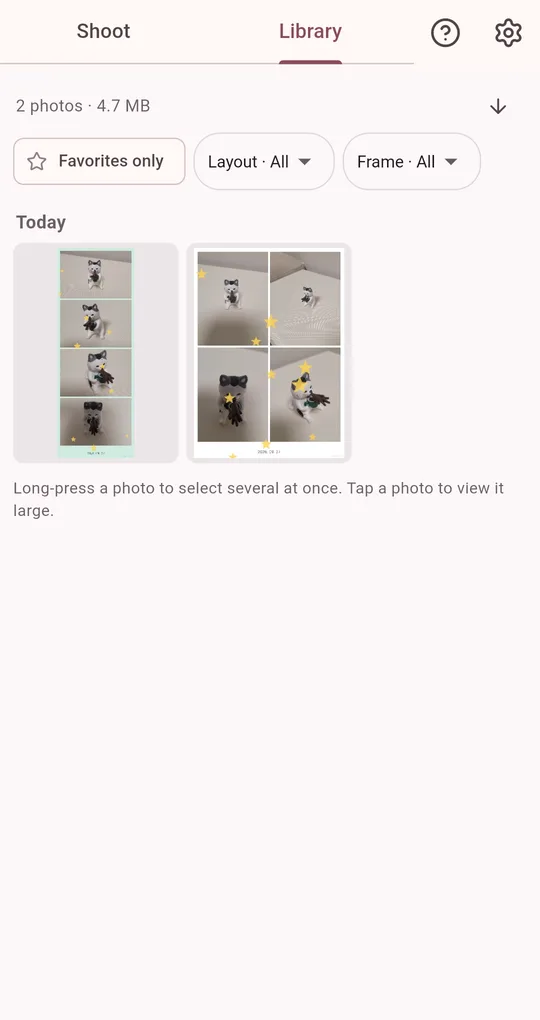
Make GIF from the Library
Open a photo in the Library and tap Make GIF to save an animation from its original shots. Each GIF export unlocks with one short ad.
Managing storage
Keeping originals uses more space. In settings, choose how long to keep them (7, 30 or 90 days or forever; 30 by default), and older originals are cleaned up automatically. Photos you favorite or add a note to are skipped, so favorite anything you want to turn into a GIF later. The stats screen shows how much space original shots use.
FAQ
It says original cuts were not kept.
They were cleaned up after the keep period, or the photo was taken with Keep original cuts off. Deleted originals cannot be recovered.
Does cleanup delete my finished photos?
No. Only the original shots are removed; finished strips stay.
Photo Booth
No sign-up, and your photos stay on your phone. Free on Android.