What to keep the same
- Place and background — the same wall, the same couch. A stuffed toy or cushion beside them shows the size change.
- Time of day — with window light, similar times keep the color consistent.
- Layout, frame and filter — decide once and do not change them.
- Date — pick a fixed day each month (the birth date, the 1st) so you do not forget.
Shooting subjects that will not sit still
Babies and pets will not wait for the shutter. Short intervals (3 seconds) catch several changing expressions. To shoot only at the right moment, switch to Tap per cut and let someone next to the phone press a volume key. The shutter sound also helps draw their eyes toward the phone.
Setting it up in the app
Steps in the Android app "Photo Booth".
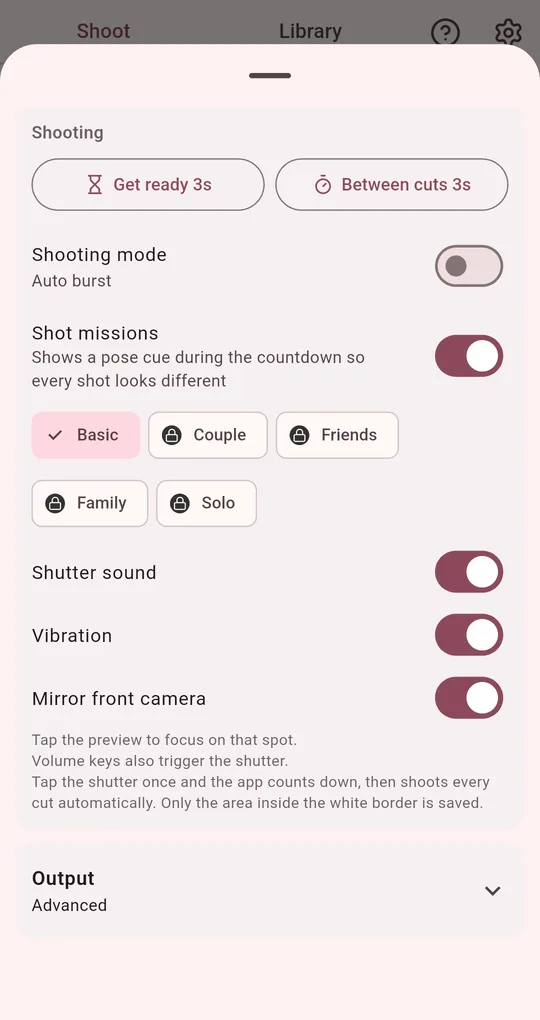
Interval and shooting mode
In the shooting settings, set Between cuts to 3 seconds or switch the shooting mode to "Tap per cut". Keep using whatever you chose in the first month.
Lock the look with a frame code
Copy the frame code for the frame, filter and spacing you chose in month one and save it in your notes. Paste it next month and the same look comes back. Family members shooting on another phone can use the same code.
Add a date caption
Set the caption under Deco to "Date" and the shooting date is printed on the strip. Custom text like "6 months" works too.
Collecting and keeping them
Filter the Library by layout or frame to see just the growth series, and add a note to each photo. Photos live only on the device, so export a backup (photos and settings in one zip file) regularly. Uninstalling the app deletes the Library with it.
FAQ
Can I combine all the months into one image?
The app saves one photo per shoot. To combine months, save them to your gallery and use a collage app.
Will a note keep the original shots from being cleaned up?
Yes. Photos with a note or favorite are skipped by the automatic cleanup.
Photo Booth
No sign-up, and your photos stay on your phone. Free on Android.