1. Phone height and distance
Put the camera slightly above eye level. Shooting from below makes faces look bigger. No tripod? Stack books, or lean the phone against a wall or shelf. For groups, step back until everyone’s shoulders fit in the frame.
2. Lead-in and interval
| Situation | Get ready | Between shots |
|---|---|---|
| Solo, right in front of the phone | 3 s | 3 s |
| Group, someone taps and runs back | 10 s | 5 s |
| Big moves like jumping or turning | 5 s | 10 s |
| Kids or pets | 3 s | 3 s (short and often) |
Getting back into place after tapping takes longer than you think. Give groups a generous lead-in.
3. Lighting
The easiest light is facing a window. With the window behind you, faces go dark. At night, a lamp in front of you casts fewer shadows than the ceiling light right above. Bright, even light also makes the frame colors look right.
4. Triggering the shutter
Tapping the screen can shake or tip the phone. Use a volume key as the shutter instead, and set a lead-in long enough to get into place.
5. Check the saved area
A photo booth app’s preview often shows more than what gets saved. Make sure every face sits inside the marked area, not on the edge.
Setting it up in the app
Steps in the Android app "Photo Booth".
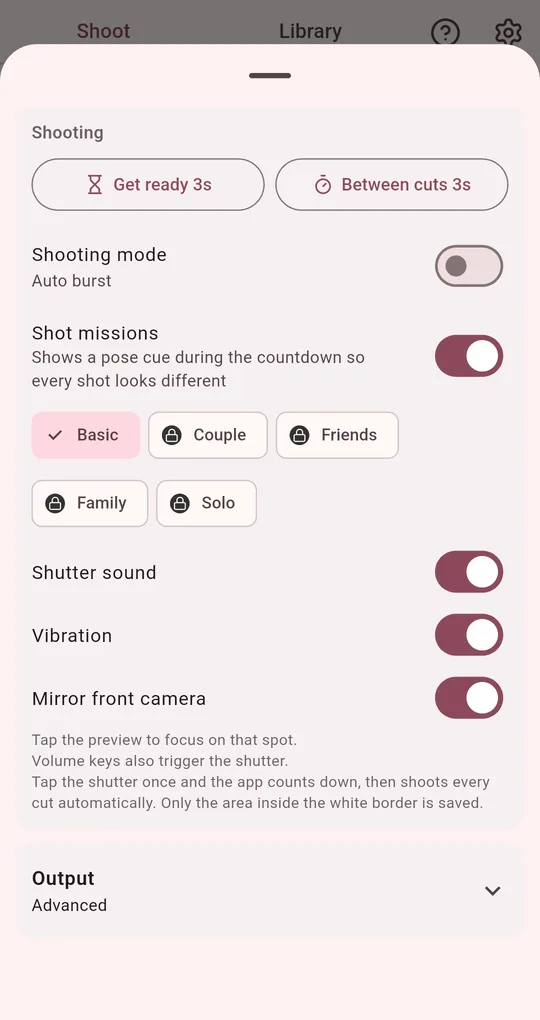
Set Get ready and Between cuts
At the top of the shooting settings, set Get ready (0, 3, 5 or 10 s) and Between cuts (3, 5 or 10 s) separately. Shutter sound and vibration are here too.
To trigger each shot yourself, switch the shooting mode to "Tap per cut".
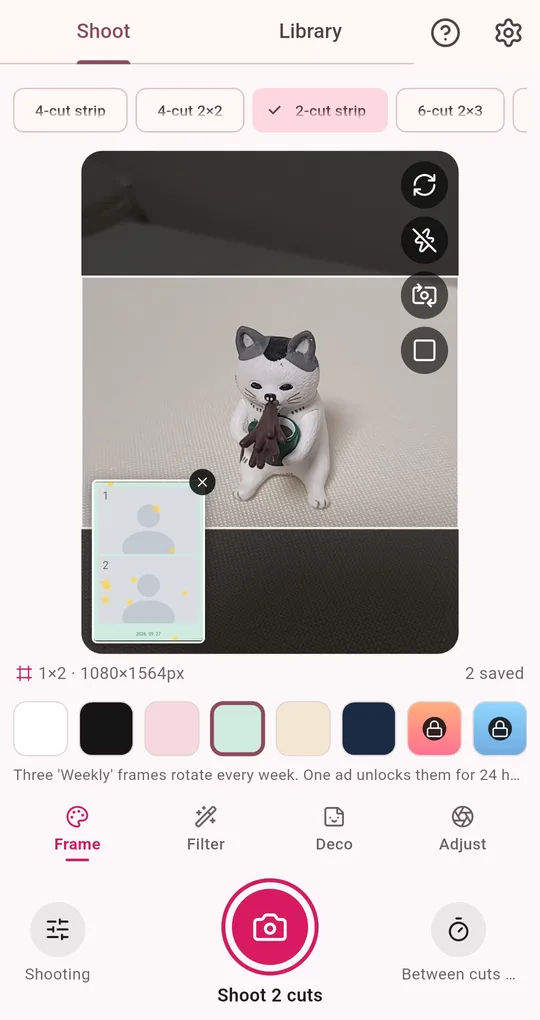
Saved area, focus and exposure
The area inside the white border in the preview is what gets saved. Tap the preview to focus on a spot, and adjust zoom and exposure. Volume keys also trigger the shutter.
FAQ
Text comes out mirrored with the front camera.
Turn off "Mirror front camera" in the shooting settings to save the true orientation instead of a mirror image.
Does the shutter sound play in quiet places?
It plays regardless of your phone’s silent setting, so turn off Shutter sound in the settings where you need quiet.
Photo Booth
No sign-up, and your photos stay on your phone. Free on Android.