Plan four shots as a story
The easiest structure is classic → change → twist → finish.
| Shot | Role | Example |
|---|---|---|
| 1 | Classic: everyone faces the camera | Big smile |
| 2 | Change: new distance or direction | Look at each other, turn to the side |
| 3 | Twist: the funny one | Surprised face, one person pulls a different face |
| 4 | Finish: anything goes | Finger hearts, free pose |
For two shots use "classic + twist"; for six or more, add more "change" shots in the middle.
Pose lists by group
Couples
- Look at each other
- Lean on their shoulder
- Make a heart together
- Back to back, face the camera
- Foreheads together
- Try not to laugh
Friends
- Arms around shoulders
- One of you makes a different face
- Jump together
- Your silliest face
- Squeeze your faces together
- Finger hearts, all of you
Family
- Squeeze toward the middle
- Put the youngest in the middle
- Hold hands, side by side
- Cheek to cheek
- Everyone wave
- Eyes closed, big smile
Solo
- Face front, chin slightly down
- Turn 45 degrees
- Rest your chin on your hand
- Look up
- Half-hide your face
- Look back over your shoulder
Show the pose during the countdown
Turn on Shot missions in the Android app "Photo Booth" and the next pose appears over the countdown. The lists above are built in as sets.
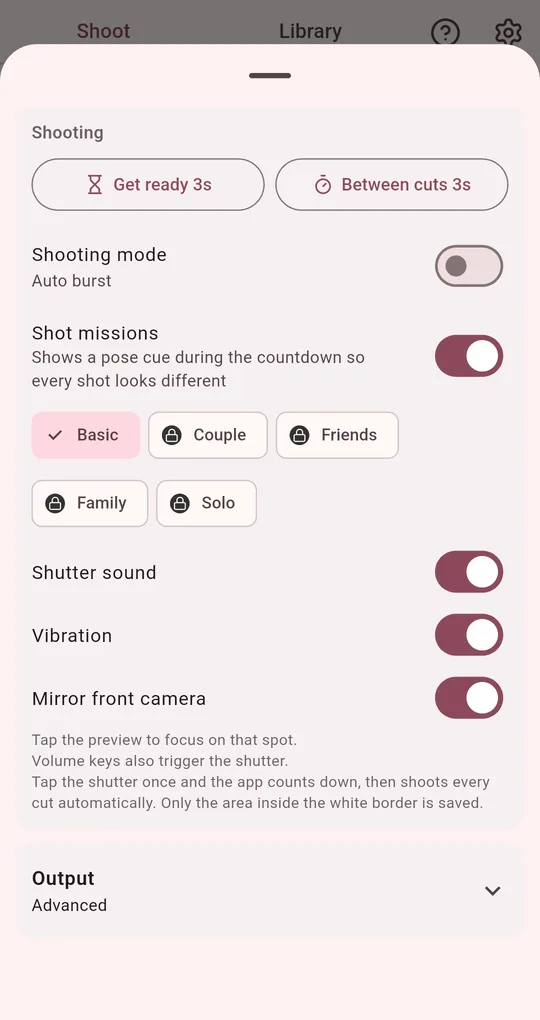
Pick a mission set
In the shooting settings, turn on Shot missions and choose Basic, Couple, Friends, Family or Solo. Basic is free; the other sets unlock for good after one short ad.
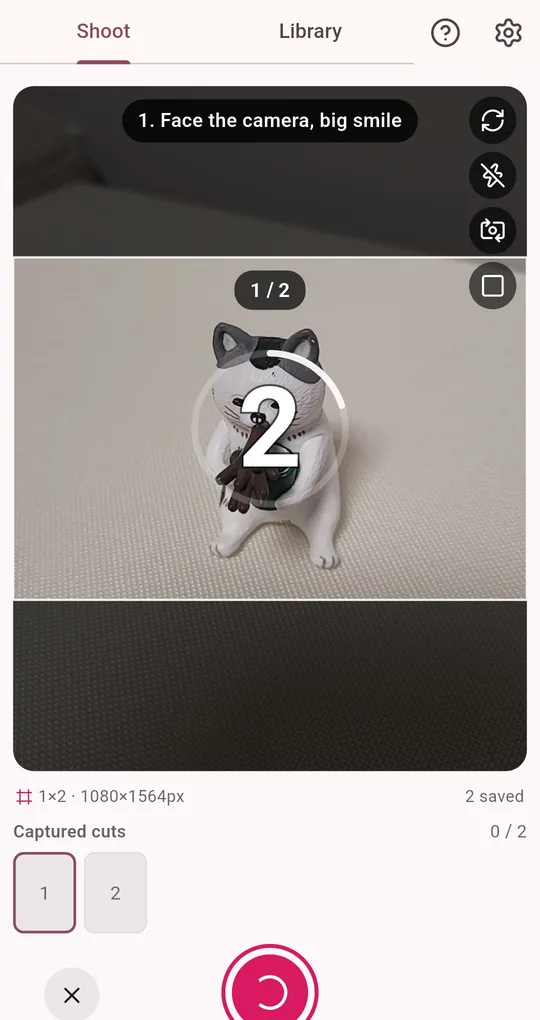
Watch the countdown, change poses
During the countdown a cue like "1. Face the camera, big smile" appears at the top. Nobody has to call out poses; everyone just watches the screen.
FAQ
One shot came out badly.
No need to start over. See how to redo just one shot.
Can I shoot without pose cues?
Turn off Shot missions in the shooting settings and only the number countdown appears.
Photo Booth
No sign-up, and your photos stay on your phone. Free on Android.