Three methods
- Weekly pill organizer — an empty compartment tells you it was taken. It solves "did I?" but never tells you the time.
- Phone alarm — tells you the time, but leaves no record once you dismiss it.
- Medication reminder app — reminders and a dose checklist in one place.
Weekly pill organizer
Fill a week in advance and one glance shows what has been taken. Simplest for tablets taken once or twice a day. It does not work for liquids, refrigerated medication or doses you take while out, and it has no alarm.
Phone alarm
Nothing to install, so it is the fastest start. Fine for a single medication. Once dismissed, the record is gone, and with several medications you end up asking which pill the 8 a.m. alarm was for. Naming the alarm after the medication helps a little.
Medication reminder app
These are real screens from the Android app "Medication Reminder". Sample medication names in the screenshots are in Korean; the app itself runs in English.
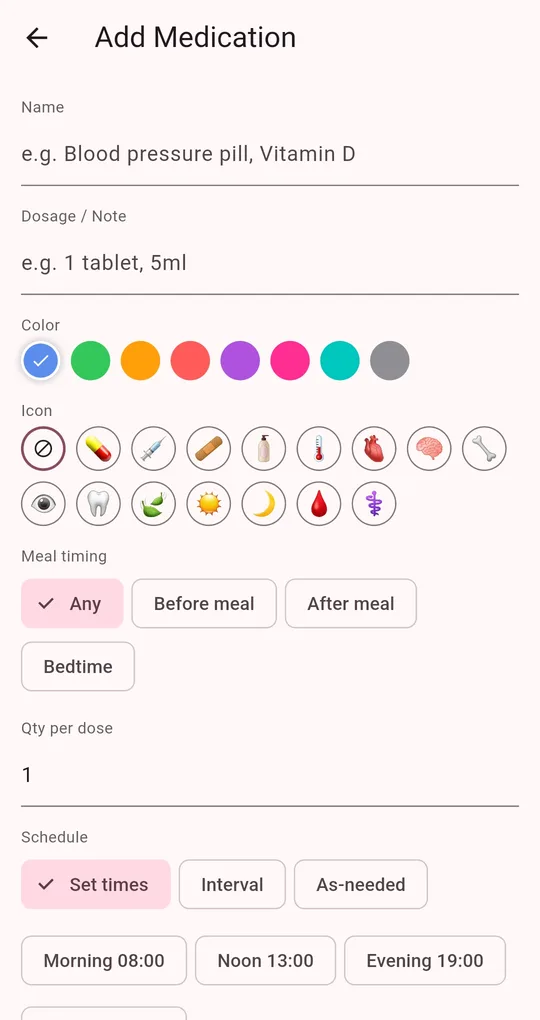
Add medications and dose times
On the Medications tab, tap Add Medication and enter the name, dosage or note and dose times. Tap the Morning 08:00, Noon 13:00, Evening 19:00 or Bedtime 22:00 presets, or type a time.
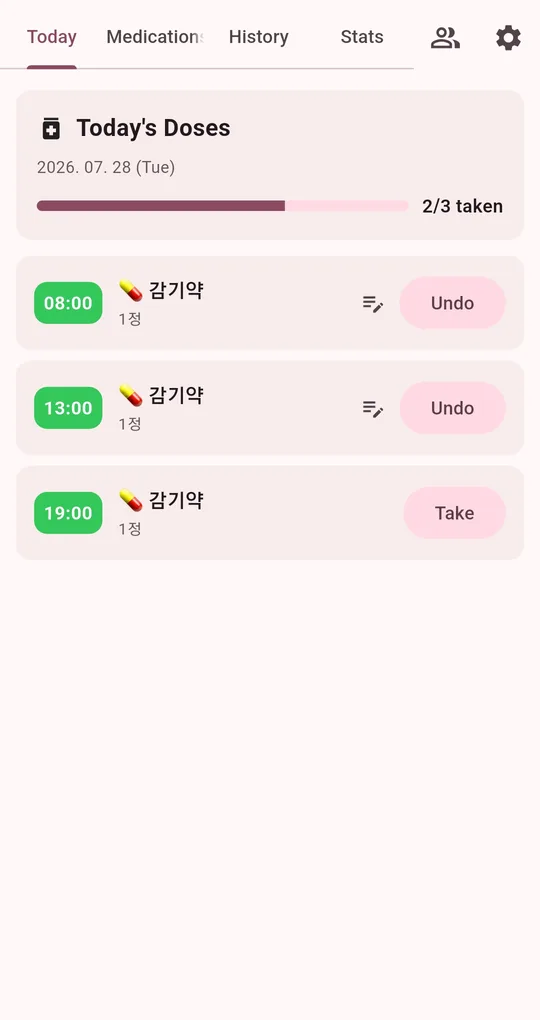
Get reminded, then check it off
A reminder arrives at each dose time, and the Today tab lists today’s doses in time order. Tap Take after taking it and the progress bar moves, for example "2/3 taken".
Side by side
| Pill organizer | Phone alarm | Reminder app | |
|---|---|---|---|
| Time reminder | No | Yes | Yes |
| Know if you took it | Empty compartment | No record | Checked-off record |
| Several medications | Mixed in one compartment | Many alarms | Separated by medication |
| Past history | None | None | History and adherence |
| Upkeep | Refill weekly | None | Set up once |
They combine well: fill a pill organizer for the week and let the app handle reminders and the record.
FAQ
Do I need an account or internet?
No. Medications and dose history are stored only on the device and never sent to a server.
Reminders arrive late.
Check notification permission and battery settings first. See when medication reminders don’t go off.
Is there an iPhone version?
It is currently available for Android on Google Play.
Medication Reminder
No sign-up, and your medications and dose history stay on your phone. Free on Android.