Checklist
- App notification permission — phone Settings → Apps → the app → Notifications should be on. Android 13 and later ask for permission on first launch; if it was denied, no reminders arrive.
- Phone Do Not Disturb — when on, reminders are silent. See whether you can add the app as an exception.
- Battery saving and app optimization — some phones put apps you rarely open to sleep. Menu names vary by manufacturer, but look under Battery for background restrictions and exclude this app.
- Notification category sound — app notifications can be on while a specific category’s sound is off.
Arriving a few minutes late
To save battery, Android may batch notifications, so a reminder can arrive a few minutes after the hour. If exact timing matters, use exact alarms; on some devices this needs the separate Alarms & reminders permission.
Settings inside the app
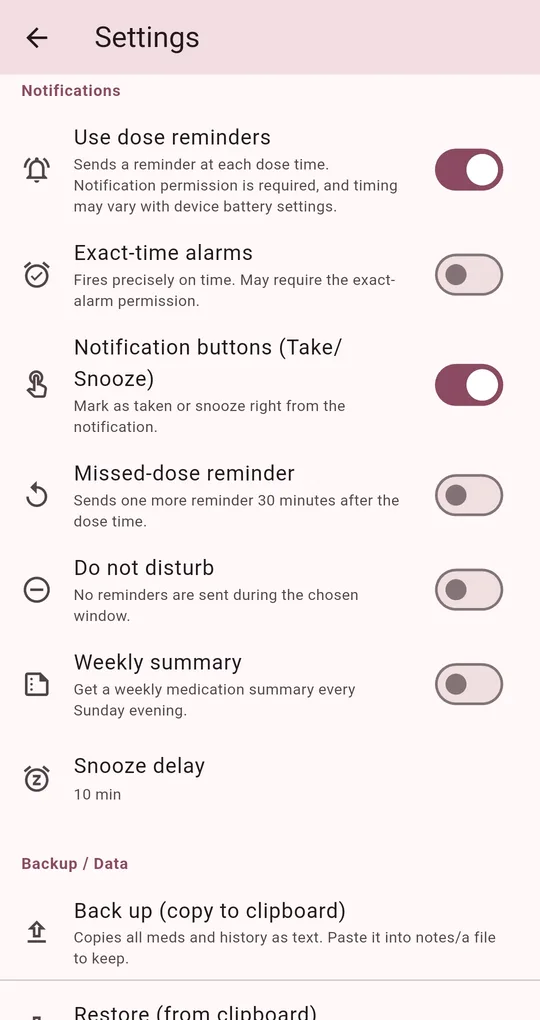
Use dose reminders
Make sure Use dose reminders is on in Medication Reminder’s Settings. Turning it off and on again reschedules every reminder.
Exact-time alarms
The default is a battery-friendly mode that may drift slightly. Turn on Exact-time alarms to be reminded on the minute; the app may ask for the device’s exact alarm permission.
The app’s own do-not-disturb window
With the app’s Do not disturb window on, dose times inside it get no reminder. If the window covers the night and you set a 22:00 dose, no reminder is expected.
FAQ
Do reminders survive a restart?
Scheduled reminders are restored after a reboot. If they still don’t arrive, open the app and turn Use dose reminders off and on.
The notification text is too short.
Notifications show the medication name. Name it something like "Morning blood pressure" and the notification says it all.
Medication Reminder
No sign-up, and your medications and dose history stay on your phone. Free on Android.