Backup is not sync
Two words that get mixed up.
- Backup uploads a copy to the cloud. Once it is up there, it exists independently of the file on your phone.
- Sync keeps both sides identical. Delete on one side and it disappears from the other.
Google Photos is closer to backup — except that deleting inside the Photos app behaves like sync. Google’s own help says that if the items are backed up, the same content is deleted on every device with backup turned on.
It depends where you deleted
| Deleted in | File on the phone | Cloud copy |
|---|---|---|
| Google Photos app | Gone | Gone (Photos trash, 30 days) |
| Google Photos, Delete from device | Gone | Stays |
| The manufacturer’s gallery app | Gone | An already uploaded copy stays |
| A cleaner app | Gone, via the trash | An already uploaded copy stays |
| On the web | Gone from devices with backup on | Gone |
Other cloud services follow the same principle but not the same details. Test with a single photo once and watch what happens before you trust it with a thousand.
What Free up space proves
Google Photos has a feature called Free up space on this device. It deletes the device copies of photos that are already backed up and leaves the uploaded ones alone — they stay in your library and you can still view, edit and share them. The fact that this feature exists is the clearest proof that removing a file from the phone does not remove the copy in the cloud.
Google’s help page adds two useful details: confirm your photos are backed up before you run it, and photos less than 30 days old may be left on the device even though they are backed up. Items it clears will not show up in your phone’s built-in gallery, or while you are offline or signed out.
A safe order
- Confirm the backup actually finished. A backing-up indicator at the top means it has not.
- Sign in on the web and check that your most recent photos are visible.
- To clear the phone only, use Free up space, or delete in a gallery or cleaner app.
- To clear the cloud as well, delete again on the web or in the photos app.
- Leave both trashes alone for a few days afterwards.
In PhotoSweep
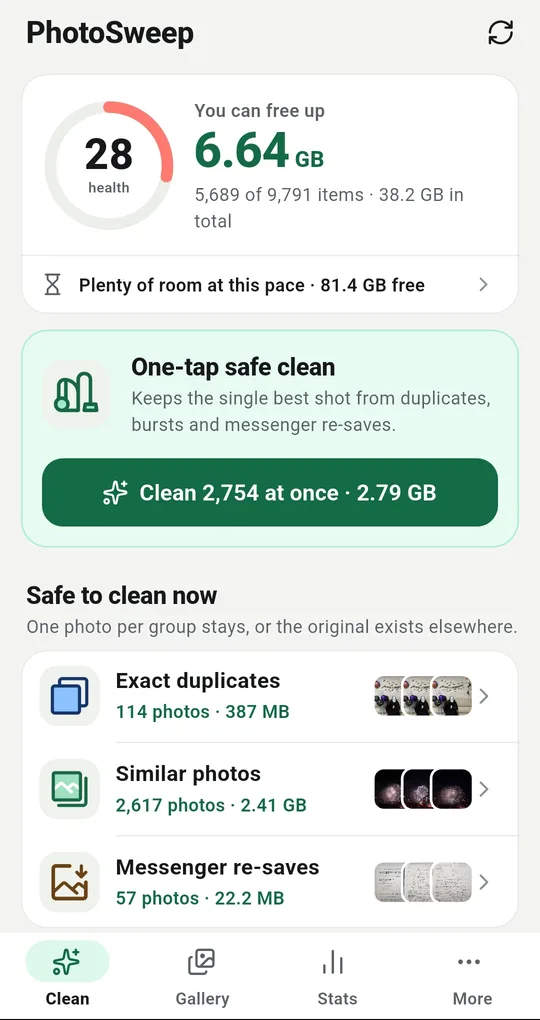
It only touches the device
PhotoSweep reads the gallery on your phone and nothing else. It has no account, no login and no server, and it never uploads a photo. Anything you clean here leaves the phone and leaves the uploaded copy untouched — memories in the cloud, space on the device.
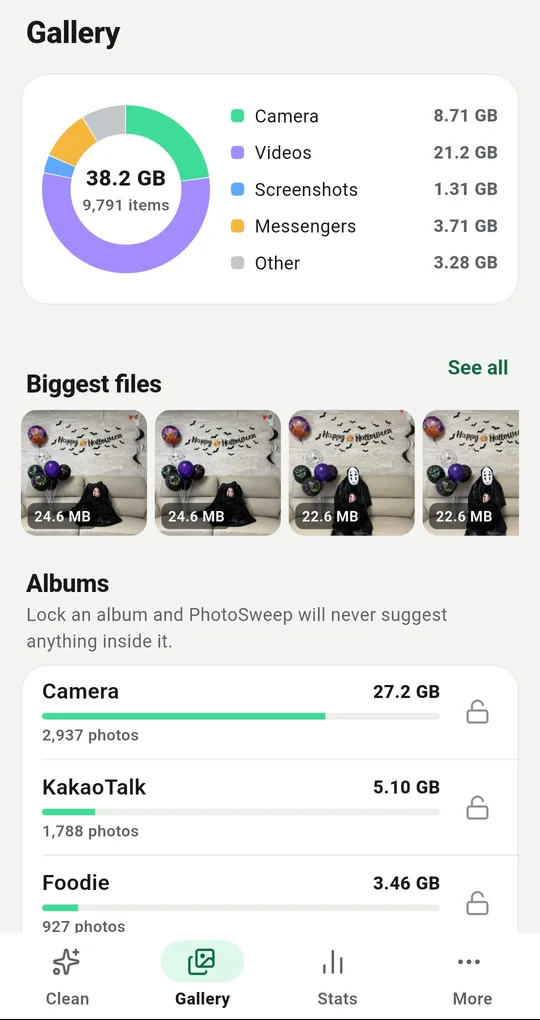
Lock the albums that have to match
If an album has to stay in step with something in the cloud, open the Gallery tab and tap the padlock next to it. Nothing inside a locked album is ever suggested.
The records stay on the phone too
Your cleanup history never leaves the device. What gets stored per photo is a fingerprint and a few numbers — sharpness, size, date — and none of that can be turned back into a picture. The only use of the internet is loading ads.
FAQ
I deleted in Photos and now it is gone from my gallery too.
That is expected: deleting in the Photos app removes the device copy as well. You have 30 days to restore it from the Photos trash.
I want it off the phone but kept in the cloud.
Use Delete from device on an individual photo, or Free up space. Deleting in a gallery app or a cleaner has the same effect.
My cloud storage is full. Will clearing the phone help?
No. Cloud storage is only freed by deleting on the cloud side. Start with the largest videos, from a browser.
PhotoSweep: Duplicate Cleaner
One photo in every group always stays. An Android photo cleaner that keeps every bit of analysis on your device.