Why location goes wrong underground
Your phone works out its position mainly from satellite signals. Below thick concrete those signals weaken or drop out, so the phone keeps the last place it had a fix, usually near the ramp. Satellite positioning also cannot tell floors apart: level 1 and level 4 are the same dot on the map.
So let location services tell you which building, and let the garage’s own labels tell you which spot.
Three things to record
| Item | Example | Why it matters |
|---|---|---|
| Level | P3, B2, Level -2 | The right zone on the wrong floor is useless |
| Zone or pillar code | C-14, Blue 7 | The only label that narrows the spot within a floor |
| The exit you used | Elevator bank 3, east stairs | Coming back through the same door retraces your path |
Many garages give each level a color or a picture. Colors are easy to remember but do not replace the level number. Write both: “Blue, P3”.
Getting it into one photo
- Turn your back to the car and photograph the pillar. The sign you can see from the car matters more than the car.
- Fill at least a third of the frame with the sign. Small text shot from far away becomes unreadable.
- Take one more at the elevator showing the elevator number and level. It becomes your starting point on the way back.
- In dim light, getting closer to the sign usually helps more than the flash.
If you have already lost it
- Recall the door you came in through and start on that floor.
- Press the lock button on your key as you walk; many cars flash their lights.
- Some large garages with plate-recognition systems let you look up your car at a pay station or kiosk. Otherwise, ask the parking office.
Recording it in the app
The Android app Parking Spot Memo saves a photo plus level and zone notes instead of coordinates, so it works the same underground with no signal.
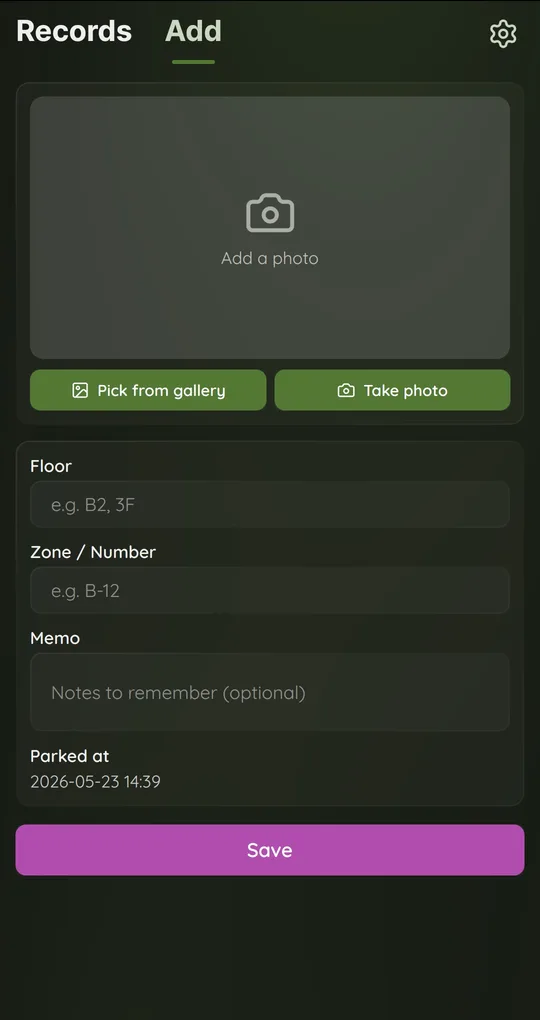
Open Add as soon as you park
On the Add tab, use Take photo to shoot the pillar code, or Pick from gallery for a photo you just took. The Parked at time is filled in when the Add screen opens and cannot be edited later, so open it right after you get out of the car.
Floor and zone in separate fields
Type P3 in Floor and C-14 in Zone / Number. At least one of the two is required to save. Put the level color or elevator number in Memo.
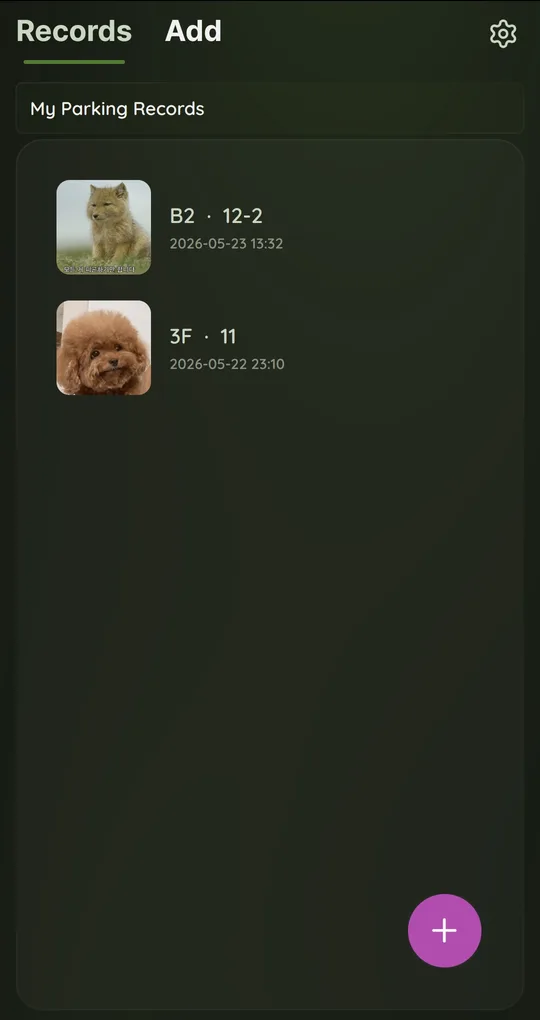
Check Records on the way back
The newest record sits at the top of the Records tab, summarized as “P3 · C-14”. Tap it to open the record and see the photo full width.
The photos in the screenshots are placeholder images used to show the app’s screens.
FAQ
Isn’t my map app’s saved parking location enough?
It works well for surface lots and street parking. Underground it gets you to the building at best and never tells you the floor, so record the level and zone too.
Does this app save GPS location?
No. It stores a photo, floor, zone/number, memo and the parked-at time only, and it does not ask for location permission.
Where’s My Car? Parking Spot Memo
Save where you parked with one photo plus floor and zone notes. Free on Android, no sign-up, and your records stay on your phone.