Methods compared
| Method | Good | Less good |
|---|---|---|
| Built-in text selection in camera or gallery (varies by phone) | Nothing to install | Not on every phone |
| Google Lens | Translate and search too | Tied to a search service |
| A text recognition app | Pick exactly the lines you want | One more app |
When on-device matters
For a bank letter, a lease or a family member’s documents, it feels better if the image never leaves the phone. Text recognition in the Android app QR & Barcode Scanner runs on the device and doesn’t send results to a server.
Common misreads
| Mix-up | Where it bites |
|---|---|
| 0 and O | Tracking and order numbers |
| 1, l and I | Wi-Fi passwords, coupon codes |
| 5 and S, 8 and B | Codes mixing letters and digits |
| Missing dashes or merged spaces | Account numbers, phone numbers |
For bank transfers, paste the number and then check the account holder name your banking app shows before you send. A faded receipt is quicker to re-shoot straight-on in even light than to correct.
Pick lines and copy
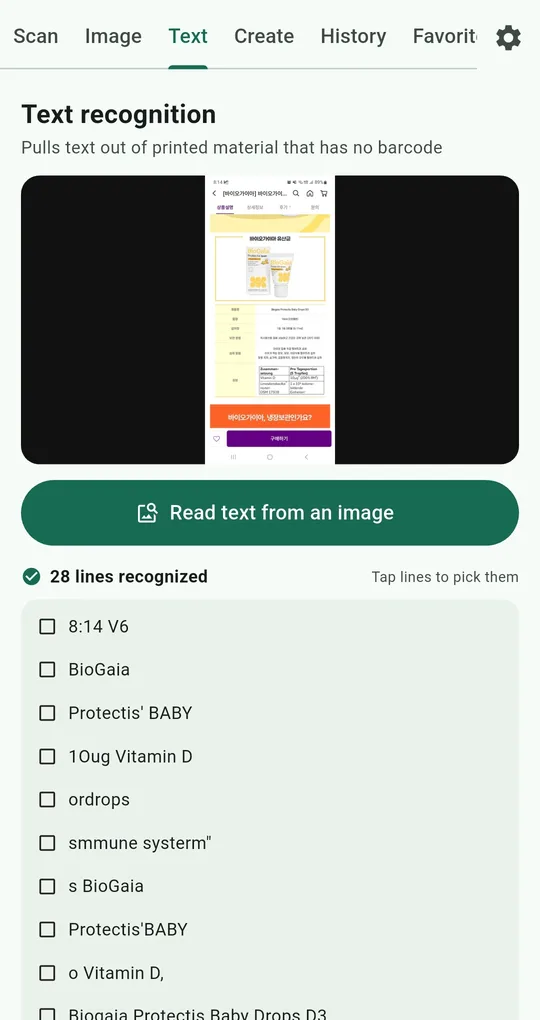
Text tab › Read text from an image
On the Text tab of QR & Barcode Scanner, tap Read text from an image and choose a photo you already took. It reports something like “28 lines recognized” and lists them below.
Tap only the lines you need
Tap the lines you want, then Copy or Share. Instead of the whole receipt, grab just the total or just the tracking number for a note or a chat.
Turn text into a code
Make a code from this sends the selected text to the Create tab. Handy for reading a router sticker’s password and making a Wi-Fi QR code from it.
The recognition model follows the app language. In English the app uses the Latin-script model, so for Korean, Japanese or Chinese text, switch the app language in Settings first.
FAQ
Can it read text live from the camera?
The Text tab reads from a photo (an image file). Take the picture first, then choose it.
Does it read handwriting?
It’s built for printed text, so accuracy on handwriting drops a lot.
QR & Barcode Scanner Reader
No sign-up, and your scans stay on your phone. Free on Android.