How it works
- When you leave, the game saves the time and your production per second.
- When you return, it compares the clock and works out how long you were away.
- It adds time away (up to the cap) × production per second, all at once.
Nothing runs while the app is closed, so it uses no battery or data. Leaving the screen on does not raise your earnings; it only drains the battery.
Why there is a cap
Without a cap, coming back after a week would pay a week’s worth and there would be no reason to open the game. So most idle games cap offline time at some number of hours and sell upgrades that raise it. Time beyond the cap is simply lost.
Timing your check-ins
| Routine | When to check in |
|---|---|
| 8-hour cap, bed at 11 pm | Right after waking at 7 am: almost nothing lost |
| Workday of 9+ hours | Open once at lunch to settle |
| Raised the cap | Size it to your longest gap (sleep or work) |
In the game
The Welcome back screen
Leave Infinite Universe for a minute or more and a Welcome back screen shows how long you were gone and how much your universe expanded. Only auto expansion devices work while you are away, with an 8-hour default cap. If you went past the cap, it shows how long expansion was stopped, and you can watch an ad to recover that time or to double what you received.
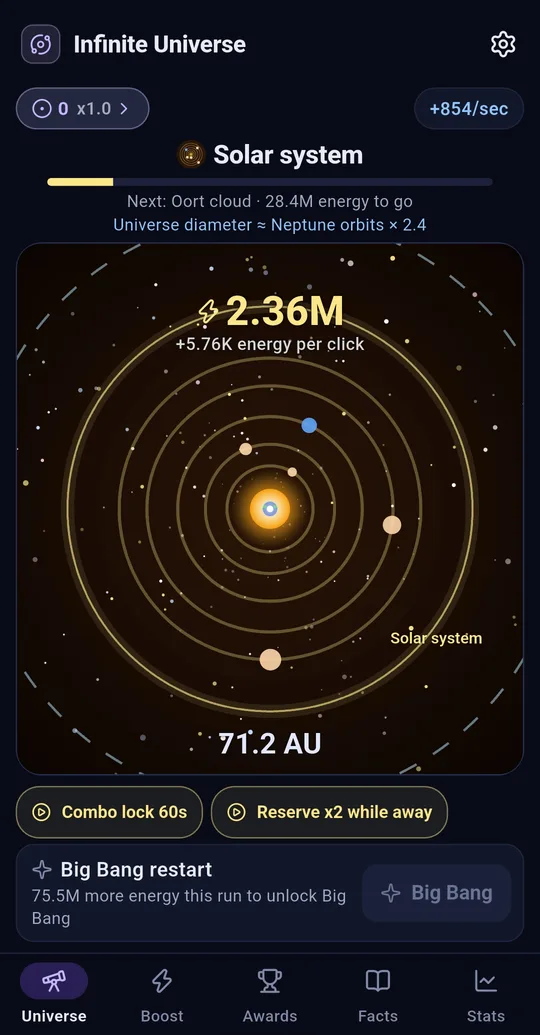
Reserve x2 while away, and the cap alert
Before leaving, set Reserve x2 while away (ad reward) on the Universe tab to double your next settlement. Turn on Idle limit alert from the Welcome back screen or Settings to get one notification when the cap is reached. Notification permission is requested only when you turn this on.
Time dilation research
Time dilation in Cosmic constants (paid with singularities) raises the idle limit by 2 hours per level. The Boost tab footer says the same: auto expanders keep working while the app is closed, 8 hours by default and more with research.
Switching phones
Everything is stored on your device. In Settings → Backup / Restore, tap Export backup file to create a .univbak file, then use Restore from backup on the new phone. Restoring overwrites that phone’s progress and settings with the backup.
FAQ
Can I change the phone clock to earn more?
We don’t recommend it. It can scramble your records and cause trouble with other apps’ notifications and sign-ins.
Does it still count if I fully close the app?
Yes. The next launch settles from the last save time.
Infinite Universe: Idle Space Clicker
No sign-up, start playing right away, and every record stays on your device. Free on Android.