Whose phone should it be on
| Situation | Use |
|---|---|
| A child or someone you live with | Your phone, one profile each |
| A parent living apart who manages their own | Install on their phone |
| A parent living apart you check on by phone | Both: reminders on theirs, a call-to-check time on yours |
The Android app "Medication Reminder" stores everything on the device and does not sync between phones. If your parent checks off their own doses, it belongs on their phone.
One list per person
With everyone’s medications in one list, "3/7 taken today" tells you nothing about who. Split by person and each gets their own Today list, adherence and history.
Put the name in the reminder
Reminders show the medication name. If one phone gets reminders for several people, start each name with the person: "Mom blood pressure", "Leo cold medicine". The notification alone tells you who to go to. A different icon and color per person helps in the lists too.
Doing it in the app
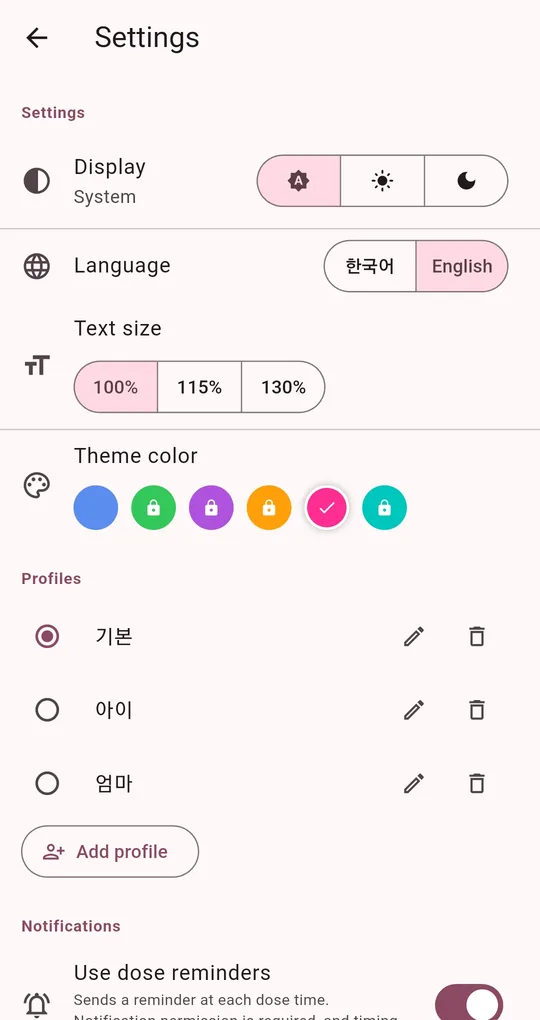
Add profiles
Under Profiles in Settings, tap Add profile for each person. Two profiles are available straight away; each extra one unlocks after one short ad.
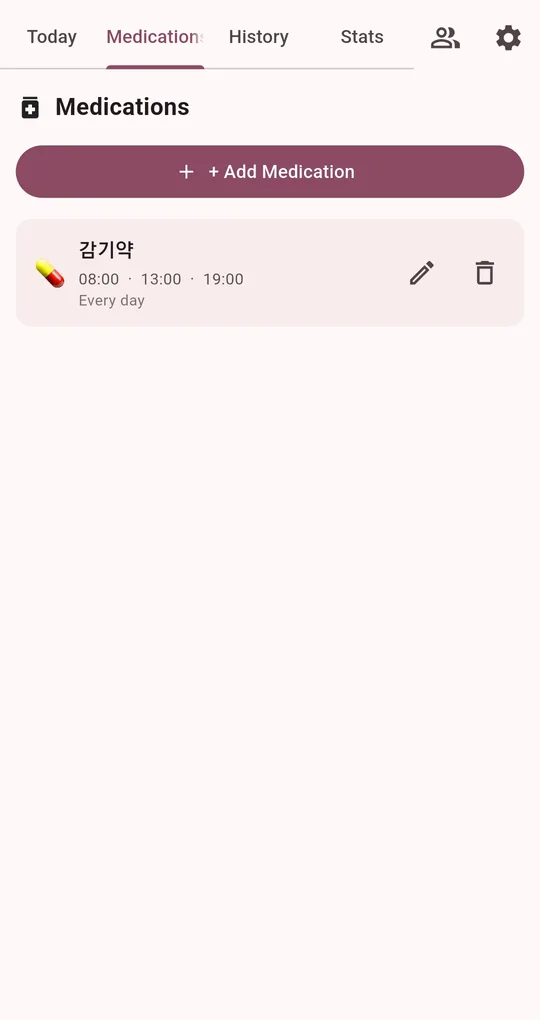
Switch profiles
With two or more profiles, a people icon appears at the top for switching. Medications, Today, History and Stats all show the selected profile.
FAQ
What happens if I delete a profile?
All of that profile’s medications and dose history are deleted. The last remaining profile can’t be deleted.
Can I see my parent’s record on my phone?
There is no sync. For appointments, they can create an adherence report on their phone and share it with you. See showing your dose record at the doctor’s.
Medication Reminder
No sign-up, and your medications and dose history stay on your phone. Free on Android.