What happens on the film
Film responds to however much light reaches it. Expose the same frame twice and the two amounts of light are added together. Nothing is erased and overwritten.
In a normal film camera you cannot do this by accident: taking a picture advances the film to the next frame. To get a double exposure photographers either re-cock the shutter without winding on, or finish the roll, rewind it and load it again from the start. The second method lands the new frames a little off from the old ones, which is where the happy accidents come from.
The brighter one wins
Adding light translates into three practical rules.
- Already bright areas take almost nothing from the second frame. A white sky is already at the top of the scale with nowhere left to go.
- Dark areas take the second frame clearly. The inside of a black silhouette fills with the second picture.
- If both frames are mid-toned, both go soft and the whole thing floats. This is the usual failure.
So the question is not what shall I combine but where is there room.
Pairs that work
| First frame | Second frame | Result |
|---|---|---|
| Dark silhouette against a bright sky | Branches, signage, a railing — any texture | The texture lands inside the silhouette only |
| A face against a dark background | City lights at night | Lights settle into the dark around the face |
| A person against a white wall | Anything | Almost nothing shows. Avoid |
| A daytime street scene | Another daytime street scene | Both float into grey. Avoid |
Film shooters add one more habit: expose each frame about one stop darker. The two exposures add up to a normal one. Skip it and the combined picture sits too bright.
Doing it without a film camera
- A camera’s multiple exposure mode — built into some digital cameras, sometimes with a choice of how the frames combine (additive, average, or brightest wins).
- Layering in an editor — stack two photos and set the blend mode to Screen or Lighten, which is close to how film adds. Lowering the opacity instead just makes both frames faint, which feels different.
- An app that combines at capture — two shutter presses, one picture. The difference from editing is that you are reading the empty areas while you shoot.
Shooting it in the app
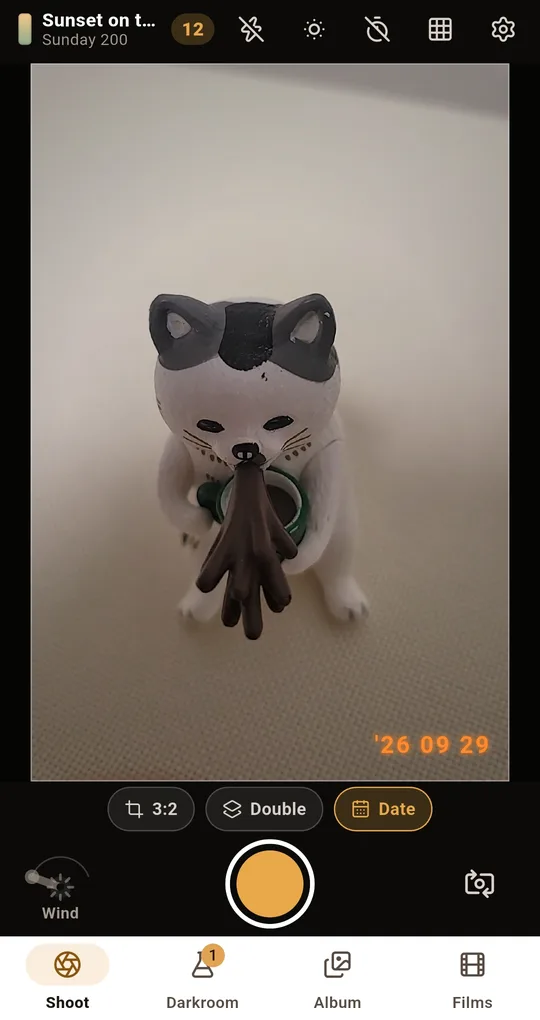
Turn on Double and press twice
The Double button at the bottom of the Shoot screen explains that two shutter taps make one photo. After the first tap the prompt changes to the second exposure; the second tap merges them into a single frame. The merge keeps the brighter areas, the way film does.
Darken each frame a little
Use exposure compensation in the icon row at the top of the Shoot screen to take each frame slightly darker, which stops the combined picture from floating. It moves in third-stop steps.
Not happy? Develop it again
A double exposure lands in the roll as one frame. Open it and press and hold to see the merged shot before any film was applied, then re-develop it on another stock or use Adjust to change the contrast.
FAQ
My second picture barely shows.
The first frame was probably bright overall, and bright areas have no room left. Use a scene with large dark areas as the first frame.
Does the order matter?
On film the two exposures simply add, so order makes little difference. In an app or an editor the blending method can change the result slightly.
Why does text become unreadable when I overlay it?
Lettering is usually dark strokes on a bright ground, and those strokes fill with the second picture, so the shapes break down. To keep text legible, make the second frame very dark.
FilmRoll: 35mm Film Camera
No account, no server, and your photos never leave the phone. Shooting and developing both work in airplane mode. Free on Android.