Time = distance ÷ average speed
Minutes = one-way distance ÷ average speed × 60. The catch is the average. It is not what your speedometer shows while rolling; it is everything from your front door to locking the bike at work, including lights, crossings where you walk the bike, and hills.
The best number is your own: ride the route once and divide distance by the time it took. The table below assumes 15 km/h (about 9 mph, busy city) and 20 km/h (about 12 mph, mostly bike paths).
Commute time table
| One way | At 15 km/h | At 20 km/h | Round trip × 5 days | Month (21 workdays) |
|---|---|---|---|---|
| 3 km (1.9 mi) | 12 min | 9 min | 30 km | 126 km |
| 5 km (3.1 mi) | 20 min | 15 min | 50 km | 210 km |
| 10 km (6.2 mi) | 40 min | 30 min | 100 km | 420 km |
| 15 km (9.3 mi) | 60 min | 45 min | 150 km | 630 km |
| 20 km (12.4 mi) | 80 min | 60 min | 200 km | 840 km |
Past about 15 km each way, the daily round trip starts to cost real time and energy. Many riders at that distance mix it up: bike two or three days a week, public transport on the others.
Why it takes longer than the map says
- Getting ready — unlocking, locking, changing and cooling down can add 10–15 minutes at each end, more without a shower or changing room.
- Junctions — every switch from bike path to road or crossing slows you down.
- Wind and hills — the same road is noticeably slower into a headwind, which is why morning and evening times differ.
- Weather days — rain, ice and heat mean you need a backup, so do not plan around five days every week.
Run a two-week trial
- Ride the route once at the weekend and time it door to door.
- For two weeks, ride on the days you can and note the distance plus a short memo (headwind, rain, minutes).
- Then look at days ridden and average distance per day, and set a monthly goal at roughly 80% of what you actually did.
Logging commutes in the app
the Android app Daily Bike Log asks only for the distance, which suits a commute that is the same every day.
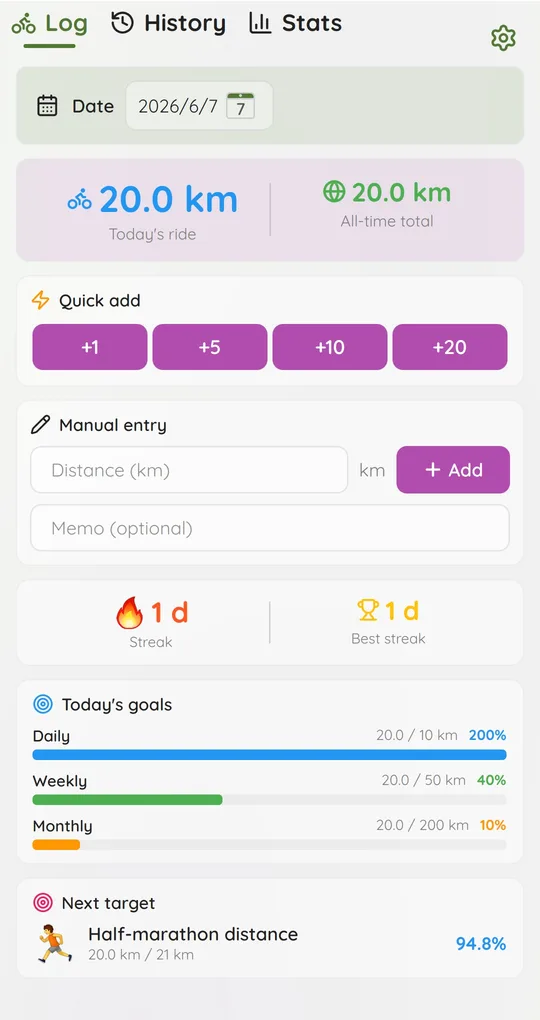
Tap the one-way distance
The Quick add buttons (+1, +5, +10, +20) add that many kilometres each time. Tap once after arriving at work and once after getting home, and both go into the same day. For a distance like 7 km, type it into Manual entry and tap Add. The app records kilometres only.
Set the monthly goal from your trial
In Settings, Goal settings lets you set daily, weekly and monthly targets in km. Use your trial average rather than the table, and watch progress under Today’s goals on the Log tab.
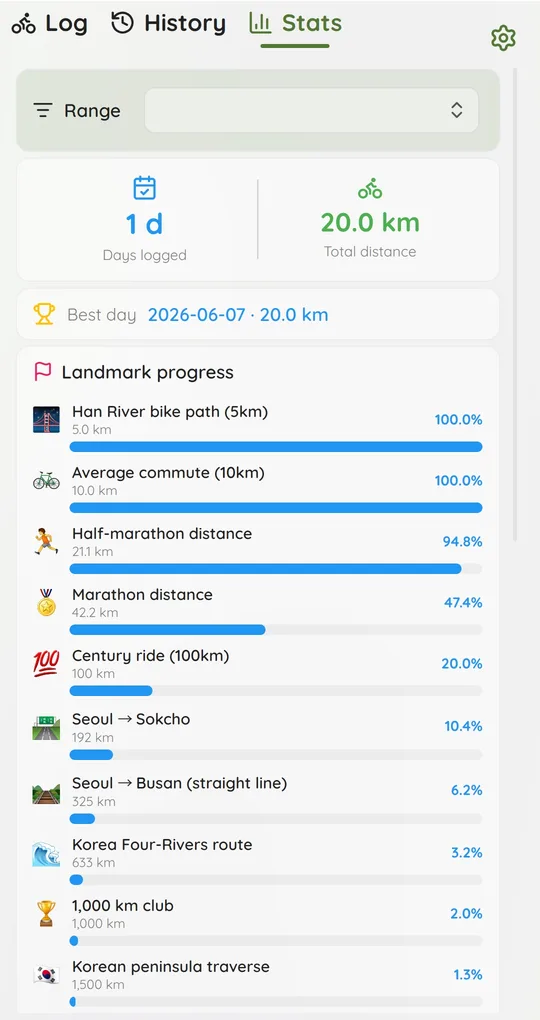
Spot the seasons
The monthly trend on the Stats tab shows the usual pattern: more in spring and autumn, less in midsummer and midwinter. That is the basis for next year’s seasonal goals.
Screenshots show the app in English with sample rides; dates use the year-month-day format.
FAQ
I do not know the exact distance.
Use the cycling route distance from a map app. If you ride the same way every day, any error is the same every day, so your totals still compare fairly.
What about bike-share days?
See logging bike-share rides for turning rental history into distance.
How do I arrive less sweaty?
Ride slower in the morning and push harder on the way home. Recalculate the morning time with a lower average speed to see what it costs.
Daily Bike Log: Ride Tracker
A cycling journal where you just type the distance you rode. No GPS pairing, no sign-up, and your rides stay on your phone. Free on Android.