Why log it
As-needed medication often comes with a daily maximum or a minimum gap between doses. You take it when you feel unwell, so the times blur. With every dose timestamped, you can compare against the label before taking the next one.
What to record
| Item | Why |
|---|---|
| Time taken | Check the gap before the next dose |
| Dose number today | Check against the daily maximum |
| Reason | Spot patterns (headache, cramps…) |
| Whether it helped | Tell your doctor |
After a month, patterns show up, like "mostly Monday afternoons". Show the record as-is at your appointment.
Logging it in the app
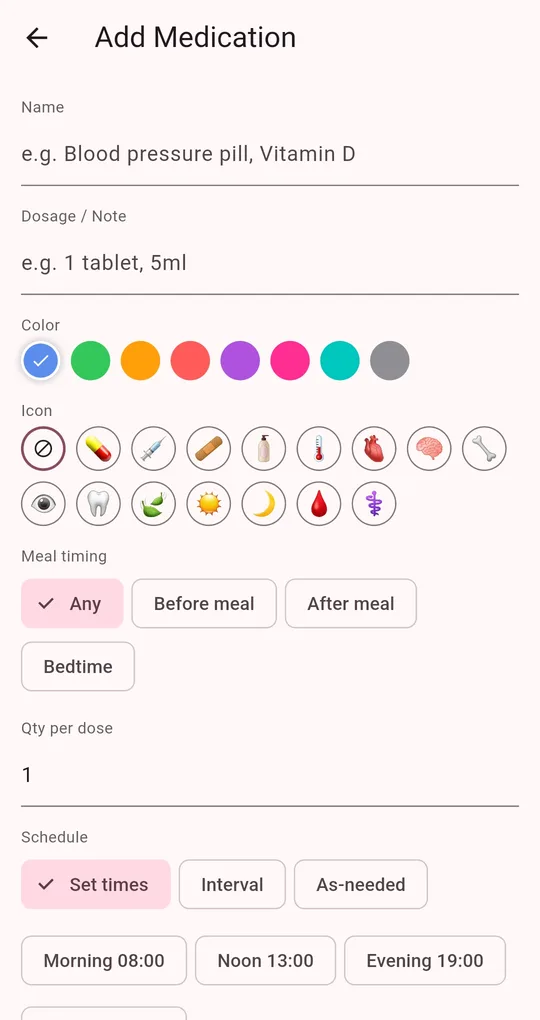
Set the schedule to As-needed
On the Add Medication screen in Medication Reminder, choose As-needed. It has no set time, so no reminders.
Tap "Take now"
In the As-needed section of the Today tab, tap "Take now" to log it at the current time. The count updates, for example "Taken 2x today".
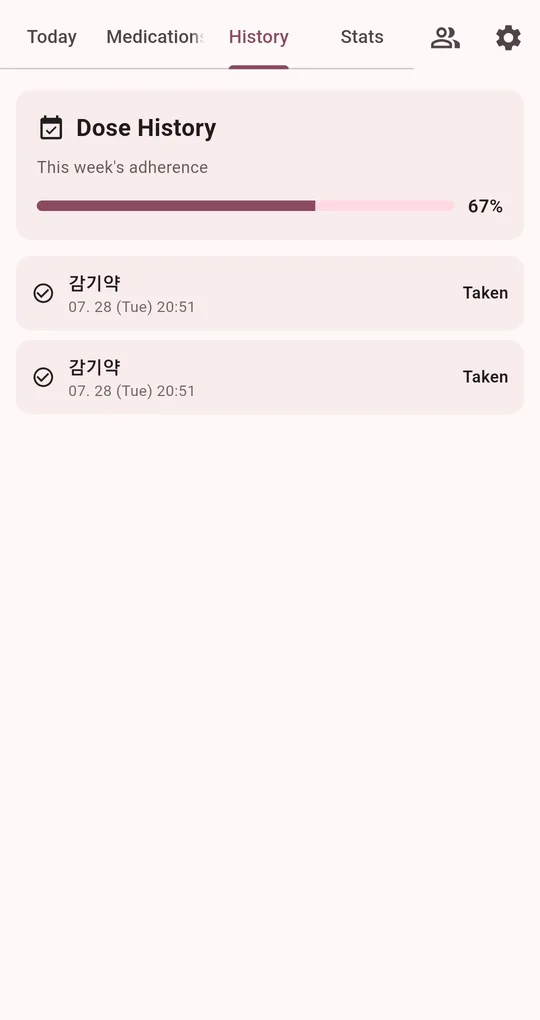
Check times in History
The History tab lists doses by date and time. Export history (CSV) in Settings moves them into a spreadsheet.
FAQ
Does as-needed medication count toward adherence?
No. It has no scheduled doses, so it is left out of adherence and only appears in the history. See how adherence is calculated.
Does it warn me when I exceed the daily maximum?
The app shows the count but doesn’t warn. Check the label or ask a pharmacist for the maximum.
Medication Reminder
No sign-up, and your medications and dose history stay on your phone. Free on Android.