Why reminders get muted
- Too many — more than a dozen a day becomes noise.
- Pointless pings — right after you drank, or after you already hit your goal.
- Wrong hours — the same schedule before work, after work and on weekends.
- No way to postpone — in a meeting you swipe it away and forget.
An office setup
| Setting | Suggestion | Why |
|---|---|---|
| Hours | An hour after you start until you leave | The first hour is busy; evenings take care of themselves. |
| Interval | Every 2 hours | Four or five a day is plenty, one glass each. |
| Days | Monday to Friday | Weekends have a different rhythm. |
| After the goal | Skip the rest | No reason to ping once you are done. |
| In meetings | Tap "Later" | Dismissing means forgetting; snoozing brings it back. |
Help without notifications
- Keep a glass or bottle of known size on your desk. One refill becomes your logging unit.
- Make taking it into meetings a rule.
- Attach a glass to things already in your day, like right after lunch (building the habit).
Setting it up in the app
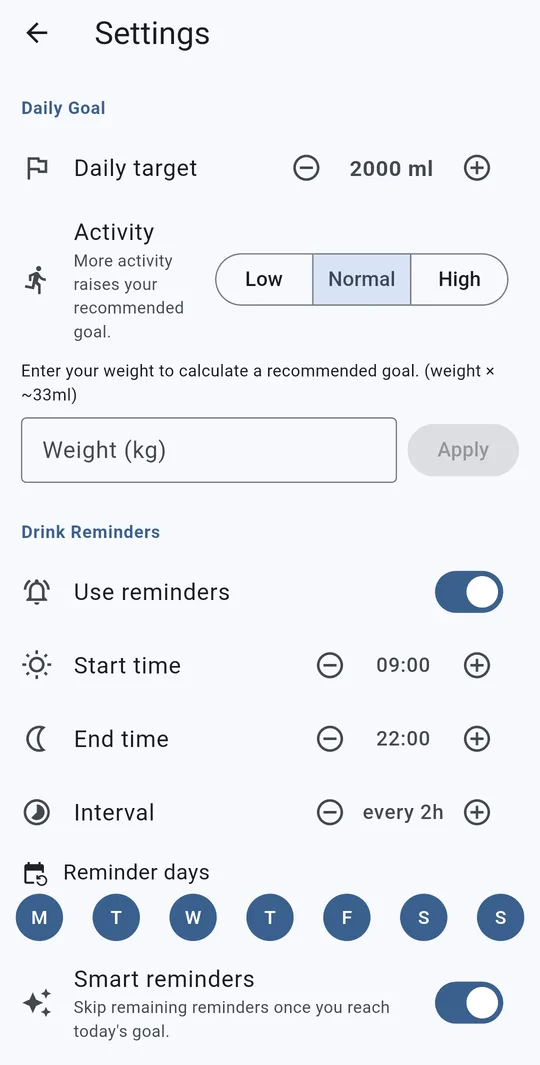
Hours, interval and days
In Water Tracker, open Settings > Drink Reminders, turn on Use reminders, and set Start time and End time (on the hour), Interval (1–6 hours) and Reminder days. The defaults are 09:00–22:00, every 2 hours, every day. For the office, keep weekdays only and set the end time to when you leave.
Turn on Smart reminders
With Smart reminders on, the moment you reach today’s goal the rest of the day’s reminders are skipped; they resume the next day.
Log or snooze from the notification
Tap "Log a glass" on the notification to record 200 ml of water (applied when you next open the app), or "Later" to be reminded again in 10 minutes. In a meeting, tap Later.
FAQ
Reminders arrive a few minutes late.
Android battery saving can delay scheduled notifications. Turning off battery optimization for the app in your phone settings may help.
Can I get them silently?
Set the app’s notifications to silent in your phone’s app notification settings so they only appear in the shade. The in-app Sound and vibration option is feedback when you log a drink.
Water Tracker: Drink Reminder
No sign-up, and your drink log stays on your phone. Free on Android.