Where to find old trip dates
Memory is usually off by a year or two. Check these in order and most dates fall into place.
- Phone photos — search your gallery for a place or city name and the capture dates appear. Fastest and most accurate.
- Email — search for "e-ticket", "itinerary", "booking confirmation" or the hotel site you used. Departure and return dates come together.
- Card statements — foreign transactions narrow down when you were abroad.
- Passport stamps — accurate when present, but automated border gates often leave no stamp.
What to record for each country
You do not need everything. Keep what you will actually use later for "where next?" or "how many countries?".
| Field | Useful later for | Example |
|---|---|---|
| Dates | Days stayed, sorting by year | 2026-08-05 to 2026-08-12 |
| Purpose | Separating holidays from work or living abroad | Travel / Business / Transit / Living / Study / Other |
| City or region | Where in the country you went | Paris, Nice |
| Companions | Finding the trip with a certain person | family, friends |
| Rating | Deciding where to go back | 1 to 5 |
| Transit only | Deciding what counts toward your total | Only changed planes |
| Photo and note | Bringing the memory back | One photo, one line |
If you prefer a spreadsheet
In Excel or Google Sheets, keep one row per country (or per visit) with columns like these so sorting and filtering stay easy.
| Country | Start | End | Purpose | City | With | Rating | Transit | Note |
|---|---|---|---|---|---|---|---|---|
| Japan | 2025-03-01 | 2025-03-04 | Travel | Osaka | Family | 5 | No | Cherry blossom week |
| United Arab Emirates | 2025-07-10 | 2025-07-10 | Transit | Dubai | Yes | Airport only |
Spreadsheets are flexible, but typing on a phone is clumsy and you never see it as a map.
Organizing it in an app
Here is the same log in the Android app "Travel Map". Whatever you enter also colors the map and fills in the stats.
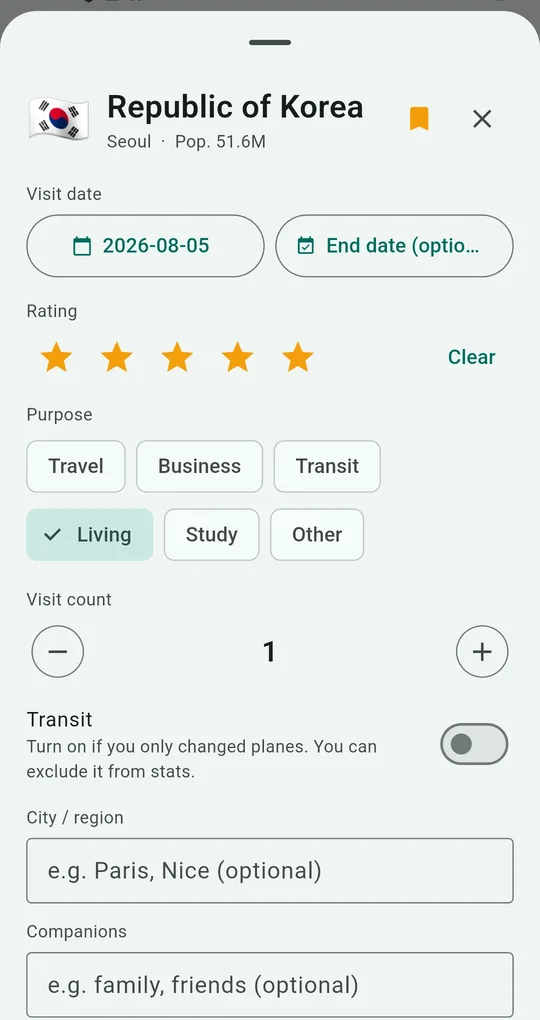
One record per country
Tap a country to open its record: start and end dates, rating, purpose, visit count, transit, city or region and companions, plus photos and a note. Days stayed are calculated from the dates.
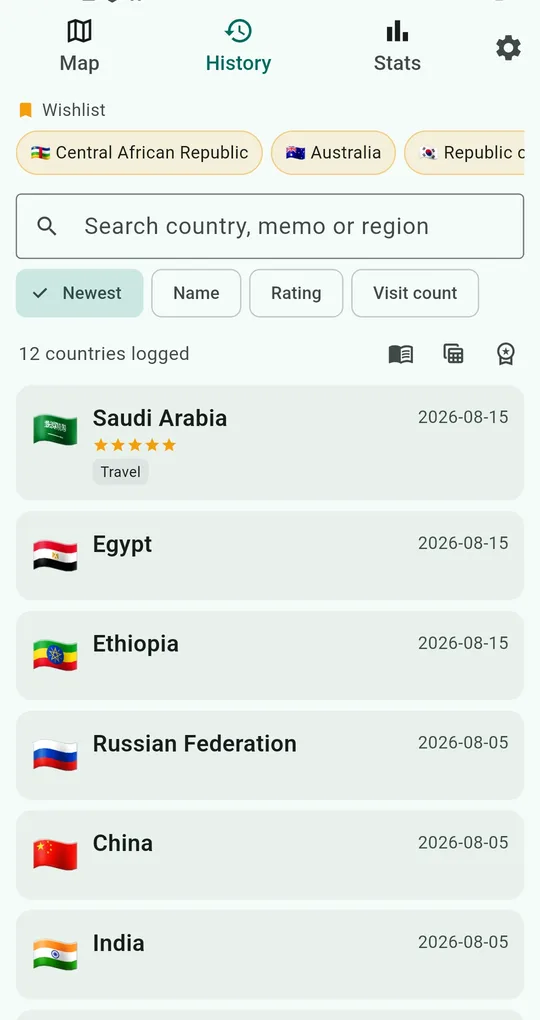
Search and sort in History
The History tab searches by country, note or region and sorts by newest, name, rating or visit count. Your wishlist sits at the top.
Swipe to delete, with an undo right after.
Export when you need a spreadsheet
Export to CSV and open it in Excel or Google Sheets: enter on your phone, analyze in a spreadsheet. Use JSON backup and restore when you switch phones.
FAQ
I have been to the same country several times. How do I log that?
Raise the visit count in the record. It feeds the heatmap color mode and the "most visited" highlight.
Should I log countries where I only changed planes?
Log them but mark them as transit, so you can include or exclude them later. See how to count countries for common rules.
Where is my data stored?
Only on your phone. There is no account and nothing is uploaded.
Travel Map: Visited Countries
No sign-up, and your records stay on your phone. Free on Android.