Why there’s no overlap
Here are 9am–6pm work hours in UTC, winter (from 1 November 2026):
| City | Offset | Work hours (UTC) |
|---|---|---|
| Seoul | UTC+9 | 00:00–09:00 |
| London | UTC+0 | 09:00–18:00 |
| New York | UTC−5 | 14:00–23:00 |
Seoul leaves as London arrives, and the London–New York overlap (UTC 14:00–18:00) is 11pm to 3am in Seoul.
Candidate times (winter)
| UTC | Seoul | London | New York | Who pays |
|---|---|---|---|---|
| 12:00 | 21:00 | 12:00 | 07:00 | Seoul evening, New York early |
| 14:00 | 23:00 | 14:00 | 09:00 | Seoul late night |
| 23:00 | 08:00 next day | 23:00 | 18:00 | London late night |
| 08:00 | 17:00 | 08:00 | 03:00 | New York 3am (avoid) |
The US starts DST on the second Sunday of March and Europe on the last Sunday, so from 14 to 27 March 2027 the London–New York gap shrinks by an hour and this table shifts.
Rotate the pain
- Make the “nobody’s worst” slot (UTC 12:00 above) the default.
- Once a month, switch to UTC 23:00 (London stays late) and once to UTC 14:00 (Seoul stays late).
- Record or summarise the meeting so whoever had the bad slot can catch up next day.
Find it in the app
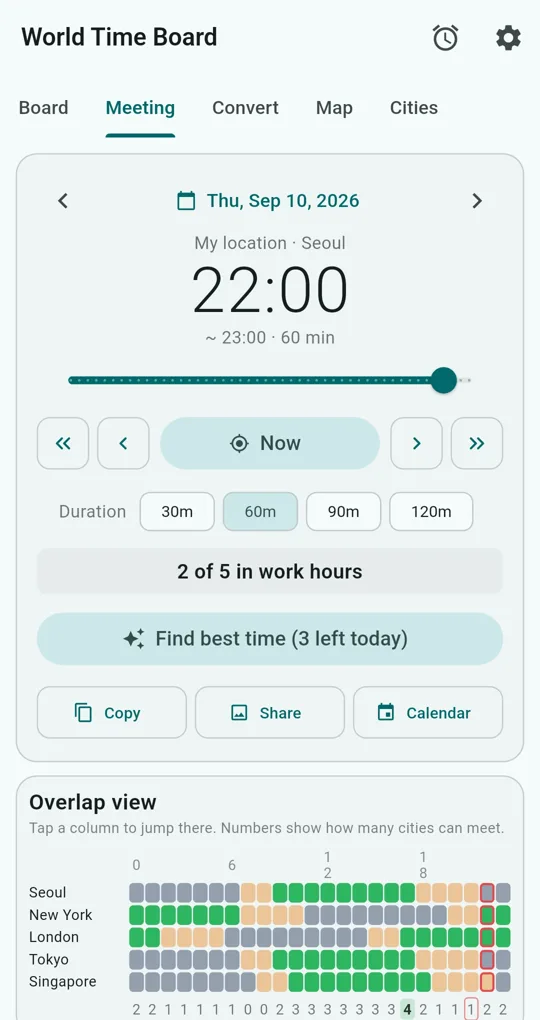
Pick a date, drag the slider
On the Meeting tab of World Time Board, pick a date and drag the slider. Every city’s local time and a summary such as “2 of 5 in work hours” update as you go. The arrow buttons step by an hour or 30 minutes.
Overlap view and best-time finder
The Overlap view colours a city × 24-hour grid and shows, under each column, how many cities can meet then; tap a column to jump there. Find best time scans all 48 half-hour slots and picks the one with the most cities in work hours (ties go to the slot with more early/late cities). Three searches a day are free; an ad adds three more.
Split by team
Put cities into groups such as “HQ team” or “Clients” and filter the Meeting tab by group. Each city can also have its own work hours (tap the tune icon next to a selected city on the Cities tab). One group is free; an ad adds two more.
The finder maximises how many cities are in work hours, so for the example above it lands on 11pm Seoul, when London and New York are both at work. Deciding to rotate fairly is a human call. The screenshots were taken with Seoul as the home city.
FAQ
Does meeting length change who is available?
Duration sets the end time and the calendar file; availability is judged at the start time. A one-hour meeting starting at 5:30pm may run past someone’s work hours, so check the end.
Are weekends and holidays excluded?
Yes, via Treat weekends as unavailable (local Saturday and Sunday) and Treat holidays as unavailable (holiday data unlocks with one ad) in Settings. Holiday data covers fixed dates, Easter-based days and major lunar holidays only.
World Time Board - Time Zones
No sign-in, no internet needed, and your city list stays on your phone. Free on Android.