Ground rules
- Write the date, not “tomorrow”; for some readers it is still today.
- Use city names, not codes like EST.
- One line per attendee city, with local time and date.
- Flag the people for whom it falls outside work hours; it is a courtesy.
Three formats
| Format | Strength | Watch out |
|---|---|---|
| Per-city text | Pastes anywhere | Emoji and symbols render differently per app |
| Calendar invite (.ics) | Lands in each calendar in local time | Recipient has to open and add it |
| Image card | Readable at a glance in a group chat | Can’t be copied as text |
Why a calendar invite works
A calendar file stores the meeting as a single moment. Each recipient’s calendar shows that moment in their own zone, so it stays right even in a week when one country changes its clocks.
Make it in the app
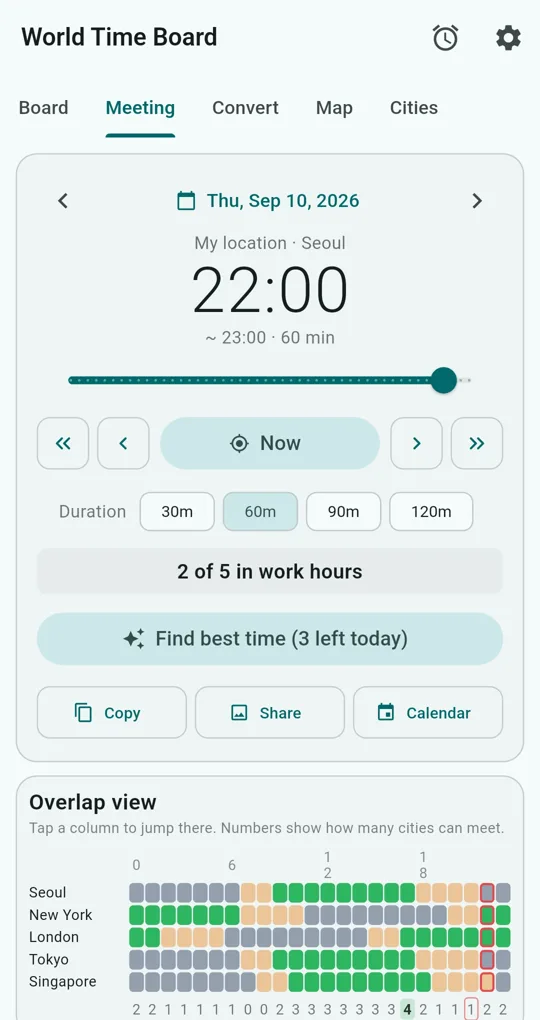
Set the time
On the Meeting tab of World Time Board, choose the date, time and duration (30, 60, 90 or 120 min).
Copy, Share, Calendar
Copy puts “Meeting time” followed by your location and one line per city (time and date) on the clipboard. Cities that can meet get a +, others a -, using plain characters so lines stay aligned wherever you paste. Share creates an image card with cities, times and notes; Calendar creates an .ics file and opens the share sheet.
| Feature | Free | With an ad |
|---|---|---|
| Copy | Unlimited | |
| Share card | Unlimited (with watermark) | No watermark for 24 hours |
| Calendar (.ics) | 1 a day | 3 more that day |
Give a city a nickname and it appears in both the copied text and the card; a note (say, a contact’s name) appears on the card. The screenshots were taken with Seoul as the home city.
FAQ
Which time zone does the calendar file use?
Start and end are written in UTC, so the file points to the same moment whichever calendar opens it.
Does it include a video call link?
No. The title is “Meeting time” and the description lists each city’s time. Add the link after importing it.
World Time Board - Time Zones
No sign-in, no internet needed, and your city list stays on your phone. Free on Android.