The snooze study
In a 2023 study in the Journal of Sleep Research, 31 habitual snoozers spent nights in a sleep lab comparing a 30-minute snooze period with getting up straight away. They got more than 20 extra minutes of sleep while snoozing, did slightly better on cognitive tests right after waking, and showed no negative effects on cortisol, sleepiness, mood or sleep quality. The researchers stressed that they only studied regular snoozers who easily fall back asleep, and that snoozing is probably not for everyone.
Three approaches
| Approach | Pros | Cons | Suits |
|---|---|---|---|
| One alarm | no broken sleep | miss it and you’re late | people who get up right away |
| Snooze (set window) | gentler wake-up | can cut total sleep | habitual snoozers who fall back asleep easily |
| Several alarms | hard to miss | light sleep broken repeatedly | backup on important days |
Rules for setting alarms
- Decide the final alarm first — the time you actually have to be up.
- Fix your snooze window — if you snooze, keep it within 10–30 minutes and go to bed that much earlier.
- Backup alarms only for big days — exams or flights, one alarm 5–10 minutes after the final one.
Adding alarms from the app
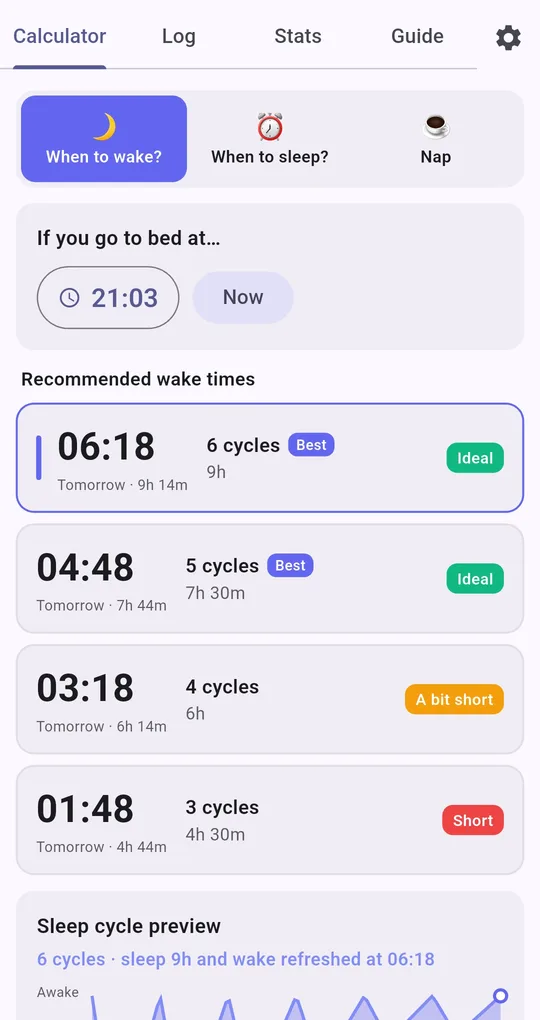
Pick a recommended wake time
In Sleep Calculator, choose When to wake?, enter your bedtime (or tap Now) and tap a wake-time card. The preview line changes to something like "6 cycles · sleep 9h and wake refreshed at 06:18".
Set alarm, then save in Clock
Tap Set alarm and your phone’s Clock app opens with that time and the label "Time to wake up". Save it there. Snooze length and count are Clock app settings.
A backup from another card
Pick another card and tap Set alarm again to add a second alarm in Clock. For a backup that isn’t at a cycle end, just adjust the time in the Clock app.
FAQ
Does it work on iPhone?
The app is currently on Android (Google Play), and Set alarm hands off to the Android Clock app.
I set an alarm but can’t see it in the app.
Alarms are stored in your phone’s Clock app, not in Sleep Calculator. Turn them off or delete them there.
Sleep Calculator
No sign-up, and your sleep log stays on your phone. Free on Android.