What goes in the message
- The transfer list — "B > A: $30", one per line, so each person can find their name.
- Where to pay — bank details or payment handle for each person being paid.
- A deadline — a date, like "by Friday".
- The breakdown — total spent and the expenses, at the bottom for anyone who wants to check.
Sample message
Total spent: $600
- D > A : $150
- C > A : $70
- B > A : $30
Pay A at: (payment handle)
By Friday, please. Reply "sent" when done.
The top part is the text the app produces; only the payment details and deadline were added by hand.
Tracking who paid
The hardest part of being the organizer is checking who has paid. Tick people off as payment notifications arrive, and you will know the moment it is finished. If you need to post a reminder, mark who has already paid.
Sharing from the app
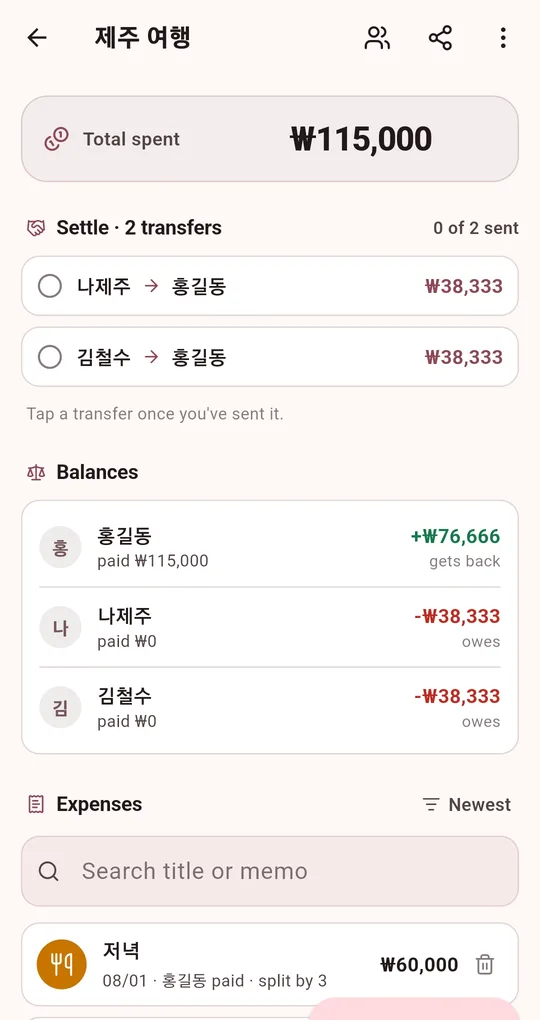
Mark transfers as sent
In the Android app "Settle Up: Split the Bill", tap a transfer on the group screen to mark it done; the counter changes to "1 of 2 sent". The group list shows how many transfers are left. The sample data in these screenshots uses Korean names and the ₩ symbol; the app itself runs in English.
Share it
The share icon at the top of the group screen offers Share as text, Share as image card and Export as CSV (Excel). Text sharing is always available, and transfers marked done get "(OK)". The image card and CSV unlock after watching one short ad.
FAQ
Can I save my payment details in the app?
There is no field for them. Paste them under the shared text.
Can others edit the settlement?
The records live only on the phone of the person who entered them. They make changes and re-share the result.
Settle Up: Split the Bill
No sign-up, no internet, and your records stay on your phone. Free on Android.