Signs at home
| Sign | Why it happens |
|---|---|
| TV and phone volume keep creeping up | Everything sounds quieter |
| Lots of “What?” | Consonants like s, f and th blur |
| Struggling in noisy restaurants | Speech is hard to pick out of noise |
| Always takes calls on the same side | There may be a left/right difference |
| Misses the doorbell or alerts | High tones are harder to hear |
Age-related hearing loss is most marked at high frequencies, and Wikipedia puts it at about one in three people by 65 and one in two by 75.
What an app can tell you
| App high-frequency test | Clinical hearing test | |
|---|---|---|
| Range | 8 to 20 kHz | Typically 250 Hz to 8 kHz |
| Measures | Highest tone heard | Quietest sound heard at each frequency |
| Equipment | Phone and earphones | Calibrated audiometer |
| Good for | Starting a conversation, a left/right hint | Diagnosis and hearing aid decisions |
The app doesn’t test the lower range that matters most for speech. “Mostly the low range” is not a diagnosis, and a good score isn’t an all-clear.
Doing it together
With the Android app SonicKit, it helps to make it something you both try rather than a test they have to pass.
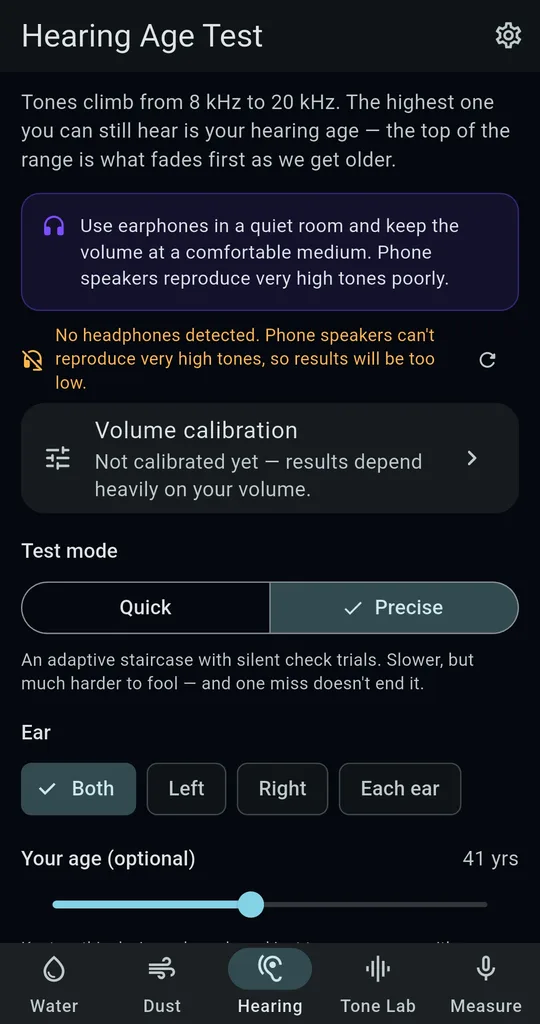
Earphones, a quiet room, calibrate
Use earphones in a quiet room and set the volume with Volume calibration so the 1 kHz tone is comfortable. Don’t crank it up.
Test each ear
Choose Each ear to test left and right in turn. If the detailed report (one ad, 24 hours) shows a big gap, it suggests re-testing somewhere quiet and mentioning it to a doctor if the gap stays.
Share the card
Use Share on the result to send the card to the family chat. Posting your own result alongside theirs makes it feel less like a verdict.
When to see someone
- Sudden hearing loss or a blocked feeling in one ear — get seen quickly. The NHS treats tinnitus with sudden hearing loss as an emergency.
- Everyday conversation is often a struggle
- Ongoing ringing in the ears, or dizziness with it
FAQ
Does it need to be on their phone?
You can use your phone and earphones. Results are saved on that phone, so to compare one person over time, keep the same phone, earphones and volume.
Do we have to enter an age?
No, it’s optional. It’s only used for the age-group comparison and stays on the device.
SonicKit - Speaker Water Eject
No sign-up, and it works without an internet connection. Free on Android.