Split by purpose
| Purpose | Examples |
|---|---|
| Trip | Weekend trips, holidays |
| Food | Went just for one restaurant |
| Family | Holidays, visiting parents |
| Work | Meetings, site visits |
| Lived here | Every neighborhood you’ve moved to, school, military service |
Maps you can make
- A moving map — only places you’ve lived
- A work map — handy for a year-end work review
- Your child’s travel map — add your child as a companion
Change the coloring
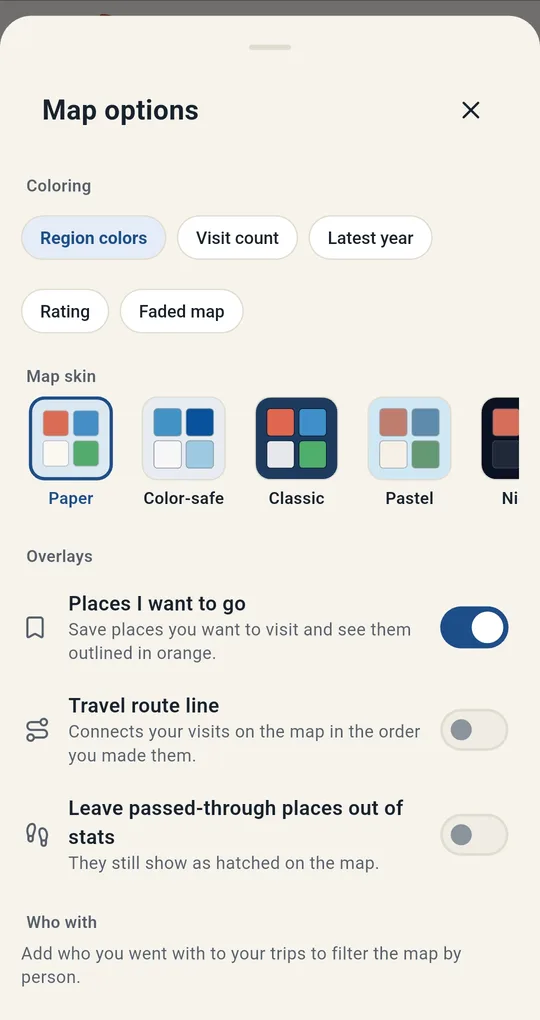
Beyond one color per area, you can shade by how often you’ve been, how recently, or how much you liked it. The "Faded map" lets places you haven’t visited in a long time fade, almost disappearing after ten years.
Doing it in the app
1
Purpose
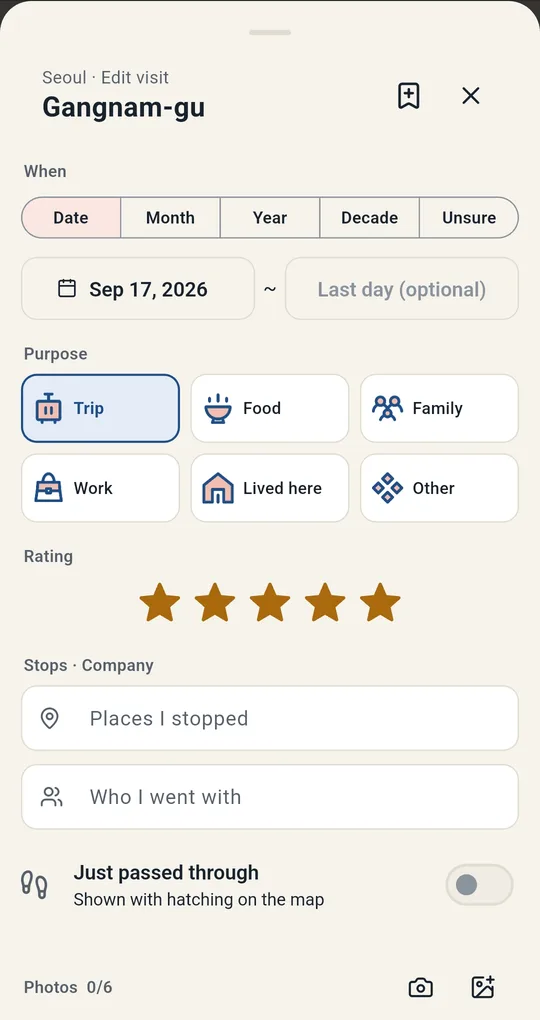
Pick a Purpose on the visit card in Korea Visited — Trip, Food, Family, Work, Lived here or Other — and add stops and companions.
2
Coloring
Choose Region colors, Visit count, Latest year, Rating or Faded map under Coloring in Map options. Modes beyond Region colors, and the Who with filter, unlock with one ad.
FAQ
Can I filter by year?
The year filter at the top of the map shows only places visited in a given year.
Can I get my records into a spreadsheet?
Export CSV opens your visits in Excel (unlocked with one ad).
Korea Visited: Travel Map Log
No sign-up, and your trips and photos stay on your phone. Free on Android.