Four groups
| Group | Use |
|---|---|
| Both visited | Swap different memories of the same place |
| Only me | Places you can show them |
| Only them | Places to get their recommendations |
| Neither | Places to go together |
Ways to use it
- Couples — pick an anniversary trip from "go together"
- Friend groups — choose a trip nobody has done
- Parents — hear the stories behind places only they’ve been
What gets shared
Comparing maps only needs which cells are painted. Dates, photos, notes and companions don’t need to leave your phone.
Doing it in the app
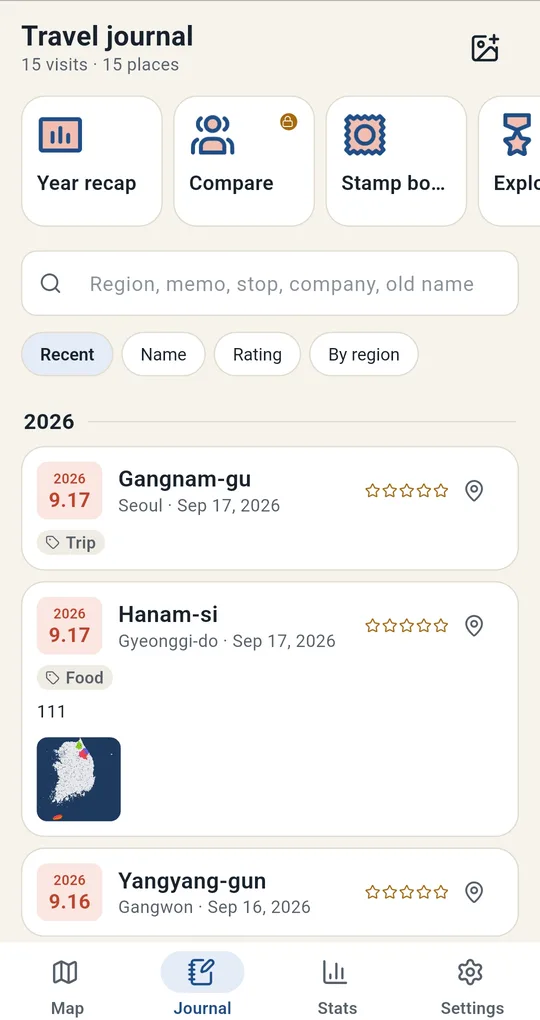
1
Send your map code
Open Compare on the Journal tab in Korea Visited and your painted areas become a one-line code to send or show as a QR code. It only contains painted cells, no dates, photos or memos (unlocked with one ad).
2
Paste your friend’s code
Paste the code your friend sends and the map splits into both, only me, only them and go together.
FAQ
Does my friend need the app?
Yes, they need to create their own code for you to compare.
I want to see only places I went with one person.
Add companions to your visits and the Who with filter paints only places you went with that person.
Korea Visited: Travel Map Log
No sign-up, and your trips and photos stay on your phone. Free on Android.