Finding the window
Treat roughly 7am to 11pm as awake on both sides, then take out the rush before work or school and the hours of classes or work. What is left is your window.
Call windows
| Pair | Period | Window 1 | Window 2 |
|---|---|---|---|
| London ↔ Sydney | 2026-10-25 to 2027-03-27 | London 7–9am = Sydney 6–8pm | London 8–10pm = Sydney 7–9am next day |
| New York ↔ Seoul | 2026-11-01 to 2027-03-13 | New York 7–9am = Seoul 9–11pm | New York 7–9pm = Seoul 9–11am next day |
| Los Angeles ↔ Sydney | 2026-11-01 to 2027-03-13 | LA noon–2pm = Sydney 7–9am next day | LA 7–9pm = Sydney 2–4pm next day |
For a student in Europe or the Americas with family in Asia, the student’s evening (the family’s morning) is often better for a long call than the minutes before the first class.
It shifts with the seasons
Northern and southern hemispheres change clocks in opposite directions. Sydney moves forward in October as London and New York move back, so a London–Sydney call slot moves by two hours within a month.
Keep track in the app
Name the cities after people
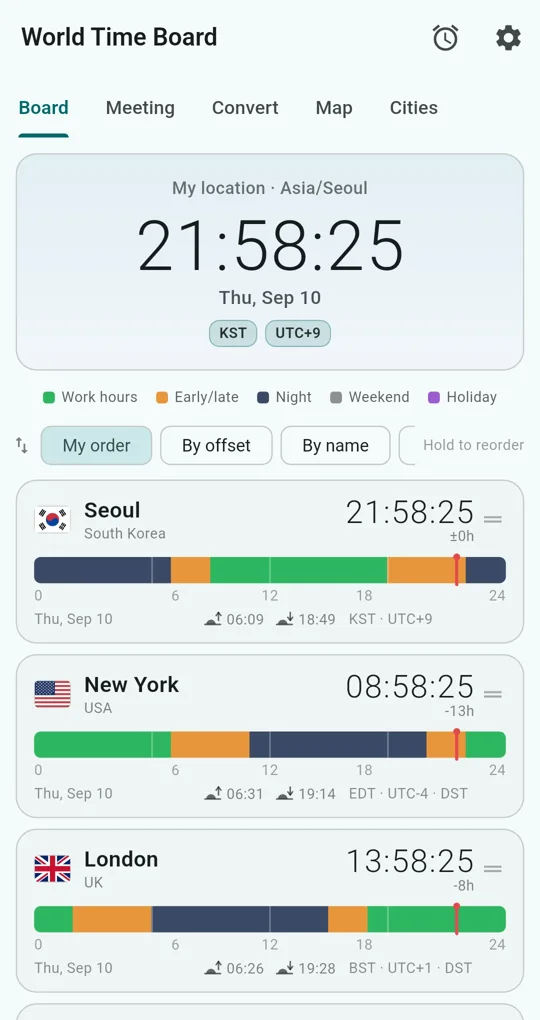
Add the city on the Cities tab of World Time Board, tap the tune icon and give it a nickname (“Mum”, “Sam”) and a note such as a class timetable. The Board shows straight away whether it is night there (navy).
Alarms in their time
Tap the alarm icon at the top right and add a New alarm with a city and a time. It rings at that city’s local time, so “8pm in Sydney” stays 8pm in Sydney after either side changes clocks.
Alarms are scheduled in a way that may arrive a few minutes late, and only the next one is booked; the app recalculates whenever it is opened. For a daily reminder, open the app once a day.
FAQ
Can I set it up on my parents’ phone?
Yes. There is no sign-in, so install it and add the city where you live.
Can I see whether it is day or night there?
The Map tab shows a live day/night line with city pins and a day-or-night list per city.
World Time Board - Time Zones
No sign-in, no internet needed, and your city list stays on your phone. Free on Android.