Three ways apps handle it
| Behavior | Monthly on the 31st, in April | Yearly on Feb 29, in a common year |
|---|---|---|
| Skip | nothing in April | shows once every four years |
| Last day of month | April 30 | February 28 |
| Roll to next day | May 1 | March 1 |
If you do not know which one your app uses, check one short month by hand.
D-Day Counter’s rule
- Monthly — if the month has no such date, it uses the last day of that month: the 31st becomes the 28th (29th in leap years) in February and the 30th in April, June, September and November.
- Yearly — February 29 becomes February 28 in common years and returns to the 29th in 2028.
- After the day passes — repeating items jump straight to the next occurrence instead of showing D+.
Legal age or contract expiry rules may differ from what the app shows; see legal deadline counting.
Paydays on weekends
Some employers pay early when payday falls on a weekend or holiday, others pay late. That is company policy, so no countdown app can know it. Keep the repeating item on the nominal date and add the actual pay date separately in months with a long weekend. Korean holidays are in the 2026–2027 table.
Setting a repeat
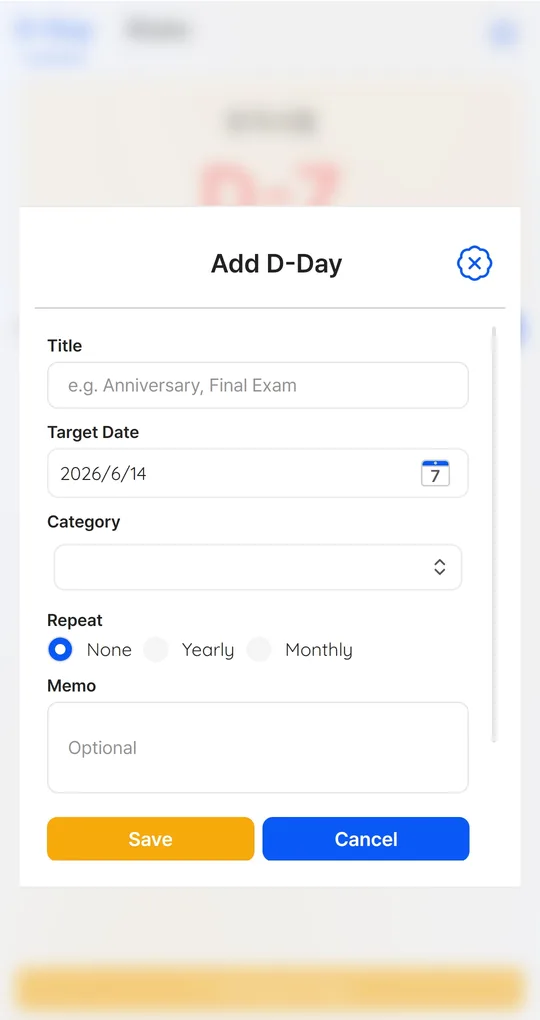
Pick Monthly or Yearly
On the Add D-Day screen, choose Monthly (payday, card bill, rent) or Yearly (birthdays, anniversaries) under Repeat. Enter just the next occurrence as the Target Date.
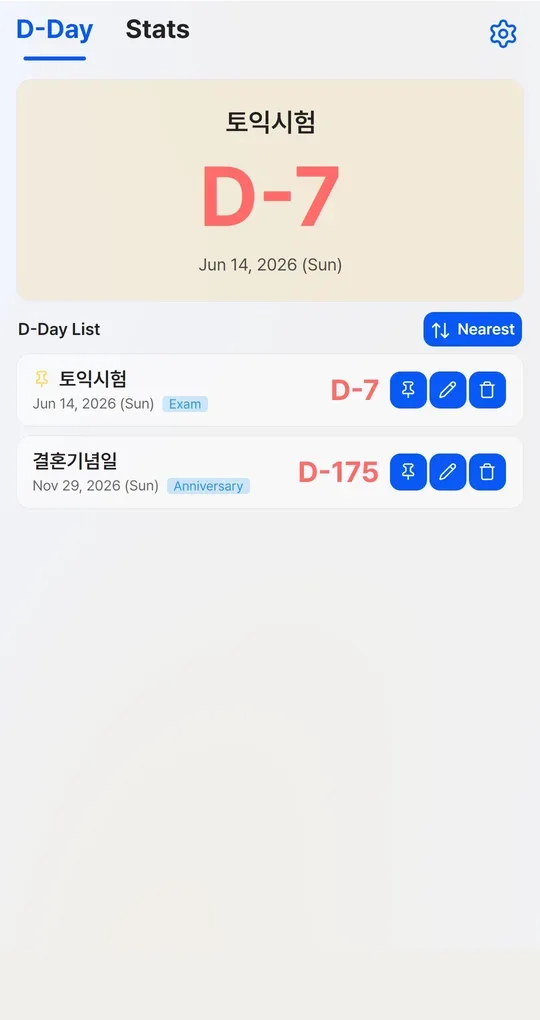
See the next occurrence in the list
The list shows days until the next occurrence. Pin payday to keep it in the big card.
The app’s English screenshots below still show sample titles in Korean (an exam and a wedding anniversary).
FAQ
My 31st reminder showed D-DAY on the 30th.
That month has no 31st, so the app used the last day. That is expected.
When does someone born on February 29 legally get older?
It depends on the jurisdiction and purpose, so this guide does not give a single answer. Check with the relevant authority.
D-Day Counter · Days Until / Since
No sign-up: just a title and a date. Everything stays on your phone. Free on Android, in English and Korean.